
Whiny Dog AI: Your Dog Does the Hmm Hmm Hmm Whine
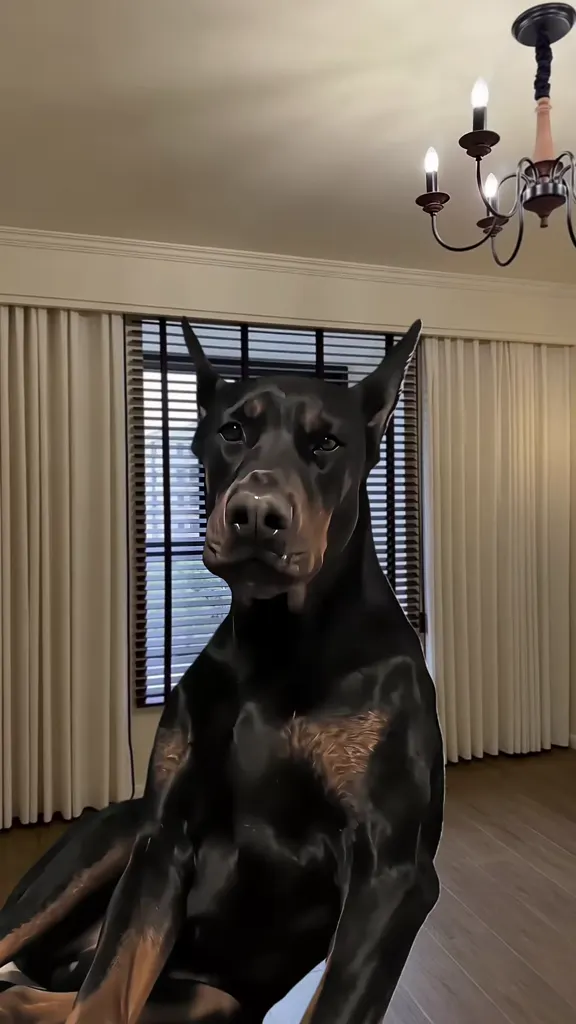
The Doberman on the cream sofa, complaining about something nobody can see. Pick a clip, upload one photo of your dog, and AI makes it sit up and whine “hmm hmm hmm” the same way, in the same room, with the original sound.
- One pet photo
- Dogs and cats
- Hmm hmm hmm sound
- Any breed
Sexually explicit (NSFW) content is strictly prohibited.
Pick a sample
Rendering takes about 7 min. Finished clips land in History.
Whiny Dog AI Examples
Thirteen whiny dog AI clips, most watched first: the Doberman that started it in September 2026, a human doing the whine himself, whining dachshunds and shih tzus, a hoodtrap edit of the same complaint, and one AI-made Doberman from the newer wave. Pick a clip, add one photo of your pet, and the AI makes it complain in the same room.
The Doberman who has complaints
@samgam81 on TikTokDog hmm meme speedrun, with a human voice
@anatoxich on TikTokThe whiny dog edit everyone reposted
@mfyls20 on TikTokLucie, the original whining Doberman
@ashleypalmer2002 on TikTokShih tzu puppies, all whining at once
@theandersonfarmskennel on TikTokTaco, the whining dog with his own song
@thewhiningdogtaco on TikTokThe little whimper
@kayennagoldens on TikTokOne little whine, every time
@chester.shihtzu on TikTokWhining dog, hoodtrap edit
@prodbyepizel on TikTokMe when bro doesn’t wanna shower with me
@zoob42 on TikTokTranslation required
@tinylegsbigheart on TikTokIf Arnold isn’t whining, something is wrong
@sirarnoldthesausage on TikTokAn AI Doberman does the whines
@colorepistle on TikTokWhat Is the Whiny Dog AI Trend?
The whiny dog AI trend is a few seconds of a dog sitting up, staring into the phone camera and complaining: a long run of “hmm hmm hmm” whines, mouth half open on each one, eyes wide and wounded, then one last open-mouth complaint and a toothy grin. It says nothing and means everything, which is why people paste it in front of their own photos with a caption about a small injustice: the chips nobody bought, the snuggle nobody agreed to. In the AI version of the whiny dog trend, your own dog does the whining, in the same room, with the same sound.
The clip behind every whiny dog AI edit is @samgam81’s, posted on 23 September 2026 with the one-word caption “ဟွန့်...” (“hmph...”). By mid-October it had 30.3M plays, 5M likes and 3.7M shares, and 16,900 videos were using its sound. Copies did the rest: an edit by @mfyls20 at 18.7M plays, a grey-wall version by @225aure2 at 8.3M, and @anatoxich doing every whine himself in a “Dog hmm meme Speedrun” that reached 21.1M. From 29 September CapCut tutorial accounts sold it as the “Whiny Puppy AI trend”, built on the template “WHINEY DOBERMAN DOG”, used 109,821 times by 29 October. On TikTok the same clip answers to whiny dog, whining dog, whiney doberman, dog saying hmm meme, whiny puppy ai trend and #whinydog.
Here the whiny dog AI trend works the other way round. The CapCut templates cut the original Doberman out of its clip and paste it over your photo, so the joke is still somebody else’s dog. This page uses the clip as a reference video: the AI redraws your pet doing the whines, in the clip’s room, keeping its own breed, coat, ears and face, and it keeps the original whine sound. Upload a cat and the cat complains. Upload yourself, and you do.
How to Make a Whiny Dog AI Video With Your Own Pet
- 1
Pick a clip
The original Doberman on the cream sofa, the human speedrun, a whining dachshund, a shih tzu in a car seat, or the hoodtrap edit. The room, the camera, the timing and the whine itself come from the clip you choose.
- 2
Upload your pet
One clear photo of your dog, head and chest in view, looking towards the camera. The whiny dog AI keeps its breed, fur, markings and face and only adds the whining mouth, the head tilts and the wounded eyes. A photo of yourself as the second image puts you in the clip as well.
- 3
Create and post
The prompt is already written. You get your pet complaining at the sample’s length with the original whine sound, ready to post with #whinydog and #whiningdog. Add the caption: it is half of the meme.
Tips for a Better Whiny Dog AI Video
A front-facing head shot beats a full body
In the whiny dog AI clip the joke is the face doing the complaining, so a photo where the mouth, the eyes and the ears are clearly visible, looking towards the camera, works far better than a distant full-body shot.
One animal per photo
Crop out other pets and people so the AI knows which face to make whine. Two dogs in one photo usually means it picks the wrong one for the complaint.
It will try to make your dog a Doberman
The reference clip is a black-and-tan Doberman, so a soft photo of a pale or fluffy dog can drift back towards pointed ears and a dark coat. A sharp photo, in daylight, with the ears and coat clear, keeps your own breed in every frame.
Write the complaint in the caption
The whiny dog meme is a reaction: people use it for the chips nobody bought, the walk that was 2 minutes late, the snuggle that was refused. Keep the caption small and specific and the clip does the rest.
Pricing
Each whiny dog ai video is one use (700 credits), whether you pick any length from 8 to 15 seconds. The price is on the button before you start, and nothing else is added.
A single use is $9.90; packs of 4 and 8 uses, or a monthly plan that posts trend videos to your accounts for you, cost less per video. A render that fails is refunded automatically.
Autopilot plans
Every month we turn the newest trends into meme videos and post them to your accounts. Each post is one of the plan’s videos, and any you make yourself come out of the same count. Cancel any time.
One-time video packs
Pay once and use them on any trend template, at any length. The credits never expire, and the other video tools can spend them too.
Use it responsibly
- Only upload photos of yourself, of people who said yes, or of your own pets.
- Do not use it to make someone look like they did something they did not.
- Label the result as AI when you post it; TikTok and Instagram both have an AI-generated tag.
Frequently Asked Questions
What is the whiny dog AI trend?
It is the TikTok trend of a dog sitting up, staring into the camera and complaining with a run of “hmm hmm hmm” whines, then a toothy grin, usually with a caption about a small injustice. The clip is @samgam81’s Doberman from 23 September 2026, which passed 30M plays in three weeks. In the AI version you pick one of those clips as a reference, upload a photo of your own pet, and the AI makes it whine the same way, with the original sound.
What else is the whiny dog trend called?
The same clip circulates as whiny dog, whining dog, whiney doberman, whiny doberman meme, dog saying hmm meme, dog hmm meme, and, on the tutorial side, the Whiny Puppy AI trend. The hashtags are #whinydog and #whiningdog. They all point at the same eight seconds: a Doberman complaining at a phone, ending on a grin.
Is the whining Doberman in the whiny dog AI clips real?
The original post behind every whiny dog AI clip looks like a phone video of a real dog, and it does not say it is AI. Viewers mostly asked about the grin at the end, and the account did not answer. Your result is different: it is generated, so label it as AI when you post it.
Is the Whiny Puppy AI trend the same thing?
Yes. “Whiny Puppy AI trend” is the name CapCut tutorial accounts gave the same Doberman clip from 29 September 2026, via the template “WHINEY DOBERMAN DOG”. Those tutorials cut the Doberman out and paste it over a photo you pick. Here your own pet is the one whining, so the dog in the clip is yours.
How do I make my own whiny dog AI video?
Pick a sample, upload one clear photo of your dog with the head and chest in view, and create. The sample is the reference video for the whiny dog AI render: the AI copies its motion, its timing and its sound and redraws the whining dog as yours, keeping your dog’s breed, coat and face. You get the clip at the sample’s length, without a watermark.
Does the whiny dog AI work with cats and other pets?
Yes. A cat in the Doberman’s place, complaining with the same run of whines, is one of the funnier versions, and the prompt on this page handles any animal: the species in your photo replaces the dog. Rabbits and small pets work too, as long as the photo shows the face clearly.
Can I put a person in the whiny dog video instead?
Yes, and people already do: @anatoxich’s “Dog hmm meme Speedrun”, with a human doing every whine out loud, has 21.1M plays. Upload a photo of yourself and pick the human version, and you take the Doberman’s place on the sofa, whining on the same beats with your own face.
Do I keep the original hmm hmm hmm sound?
Yes. A remix keeps the audio of the reference clip you picked, so your whiny dog AI video has the same whines and the same timing. The sound is the joke: it is the original whining, not a music track and not a text-to-speech voice.
What captions do people use with the whiny dog meme?
Short, specific complaints: “me when my mom doesn’t wanna buy me my chips”, “when bro says no to snuggle and cuddle to sleep”, “me when bro doesn’t wanna shower with me”, “my dog when dinner is two minutes late”. The clip is a reaction, so the caption is the setup and the whine is the punchline.
Is this the whining dog brainrot edit?
Partly. The same whine also circles as short music edits, hoodtrap and phonk remixes and “brainrot” cuts of the Doberman, which is what the hoodtrap sample on this page is. Those keep the whine and change the music; a remix here keeps both the picture and the original sound, and puts your own pet in it.
Why does my whiny dog AI version look like a Doberman?
Because the reference clip is one. The prompt keeps your pet’s species, breed, ears and coat, but a soft or dark photo gives the model room to drift back to pointed ears and a black-and-tan coat. Use a sharp, well-lit photo with the ears and markings clear, and run it again if the first take slips.
What is the Whiny Dog AI prompt?
The your dog on the sofa prompt is in the AI Prompts section below. It starts: "Image 1 is the pet, a real photo of a dog or a cat." Paste the rest into any AI video tool that accepts your photos.
Make Your Dog the Whiny One
One photo, one clip, and your whiny dog AI video complains about the unfairness of everything with the original hmm hmm hmm sound.
Make my whiny dogMore Trends to Remix
Shaking Head Trend
Twilight Baseball Scene AI
Witch Filter Effect
Photo to Talking
Day of the Dead Pet
ABCDEFG I Need Money
Smalltown Boy Dance AI
Victoria Secret AI
Whiny Dog AI Prompts
The four whiny dog AI prompts behind the versions: your dog on the original sofa, the cat version, you in the dog’s place and the puppy edition. They work in any image-to-video model that takes a reference photo and a reference clip.
Your dog on the sofa
Image 1 is the pet, a real photo of a dog or a cat. Image 2, when there is one, is the person who belongs in the clip instead of, or beside, the dog. The Pet sits on the cream leather sofa of the original clip, evening light in the window behind it. The dog sits up, stares straight into the phone camera, tilts its head and lets out a run of long, put-upon whines — “hmm hmm hmm” — mouth half open on each one, eyes wide and wounded, exactly when the dog in the reference does, then a last open-mouth complaint and a toothy grin. Keep the pet exactly as in Image 1: species, breed, fur colour and pattern, ears, eye colour and face, so its owner recognises it instantly; only the whining face, the mouth and the small head moves are new. Vertical 9:16 phone video, the room and light of the reference clip, photorealistic, one animal, no text, no logos, no watermark. Audio: the original “hmm hmm hmm” whines, room tone, nothing else.
Other versions: Whiny cat version · You in the dog’s place · Puppy edition