
Ali G Driving Scene AI: Your Photo Behind the Blue Wheel
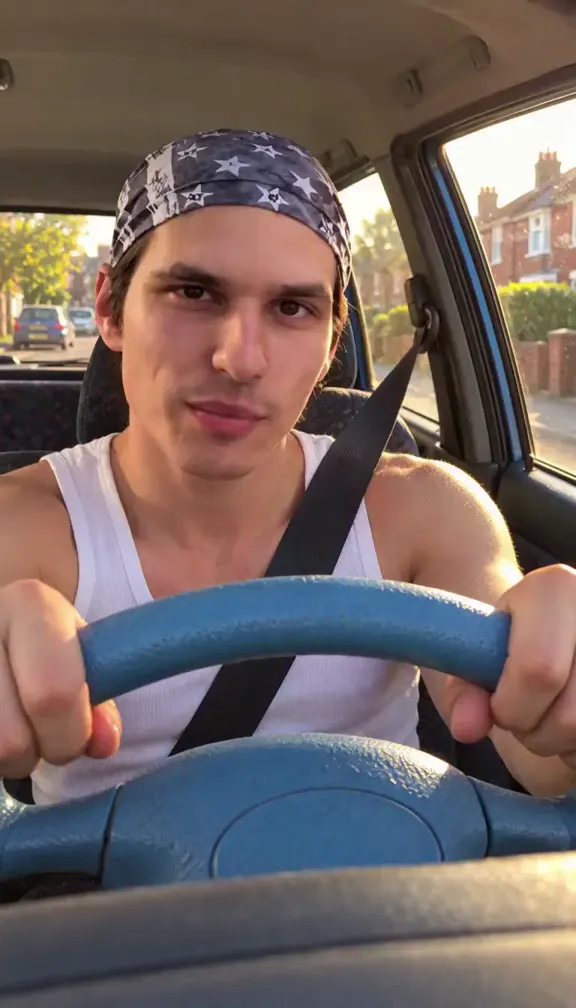
A hand on a light-blue steering wheel, a yellow soft-top rolling past red-brick semis, and a driver head-banging to the sound before pointing straight into the lens. That is Ali G in the opening of Ali G Indahouse, and it is the shot TikTok is rebuilding with other people in it. Pick a take, add one photo, and AI puts you in the driver’s seat: same wheel, same street, same head-bang.
- 9 takes to remix
- One photo
- You, a mate or the cat
- No watermark
Sexually explicit (NSFW) content is strictly prohibited.
Pick a sample
Rendering takes about 7 min. Finished clips land in History.
Ali G Driving Scene AI Takes to Remix
Nine takes of the same scene: the blue wheel, the yellow soft-top, a street of red-brick houses, and somebody head-banging in the driver’s seat before pointing at the lens. Some are clean generations other tools put out, some are the TikTok posts that carried the trend; one is a cat. Pick one and it becomes the reference for your own Ali G driving scene AI video — the car, the street, the wheel and the sound stay, and only the driver changes.
The take everyone copies
View on TikTokThe template demo
@rhcapcut0 on TikTokThe camo cap
View on TikTokThe cat at the wheel
View on TikTokThe night drive
View on TikTokThe cat, over the shoulder
View on TikTokThe fluffy-wheel stare
View on TikTokThe white sweater
@zucd.bxup on TikTokThe plaid shirt
@meowstardaily on TikTokWhat Is the Ali G Driving Scene AI Trend?
The Ali G driving scene AI trend takes one shot out of Ali G Indahouse and puts somebody else in it. A driver sits in a yellow soft-top on a street of red-brick semis, one hand on a light-blue steering wheel, head-banging and mouthing along to the sound, glancing at the camera, and at the end pushing a finger into the lens. Upload one photo and the model rebuilds that shot with your face — or your friend’s, or your cat’s — in the driver’s seat. The car, the street, the wheel and the audio stay exactly as they are.
The scene itself is the opening of Ali G Indahouse, the 2002 film where Sacha Baron Cohen’s character drives through Staines in his yellow Jeep. What makes it a trend in October 2026 is timing: Ali G: Who Iz I? landed on Prime Video at the end of the month, the character’s own account is posting clips again, and two days after the CapCut template went up on 16 October the tutorial accounts had it. The template is "Ali g" by @rhcapcut0 — nine-by-sixteen, nine seconds, about 4,800 uses and roughly 290 a day — and it takes one photo, straight to the finished clip.
On TikTok the AI takes are still small, which is what a two-week-old template looks like: @rhcapcut0’s own demo is the biggest post on the sound at 312.2K plays and 32.6K likes, @zucd.bxup’s montage of results sits at 41.9K, and the rest of the search page is tutorial accounts showing how it is made. The tool galleries have more: kavel.ai already has a page for it with three takes, ricebowl.ai and lubanai.app one or two each, and media.io, makeviral.ai and viberot.com have all put up pages this week. Google has no search volume for the phrase yet; TikTok is where it is being named.
It also travels under several names. TikTok completes "ali g driving scene ai" before anything else, then "ali g driving scene", "ali g driving scene ai trend" and "ali g driving meme"; the tutorial accounts also call it the Ali G car dance or the Ali G CapCut template, and the clip itself carries a "Wicked may" caption, which is where that search comes from. It is not the "little you trend" — that one is photos of yourself as a child — even though tutorial accounts stuff both names into one caption.
How to Make an Ali G Driving Scene AI Video
- 1
Pick a take
Choose the reference in the panel on the right: the twelve-second street take, the template demo, the night drive, or one of the two cat versions. Whatever you pick sets the camera angles, the street, the car and the length.
- 2
Upload one photo
A clear photo of the face you want at the wheel in an Ali G driving scene AI video — straight on, eyes open, front-lit, hair off the forehead. One photo is enough; a photo of your dog or cat takes the driver’s place with its own paws on the wheel.
- 3
Create and post
Your clip keeps the sound of the take you picked, so it lands on the same audio as the rest of the trend when you post it. Start with the ten-second render; the short takes are there when you want a loop.
Tips for a Better Ali G Driving Scene AI Video
A front-on photo, not a selfie angle
The driver’s face is on screen for the whole take, straight into a handheld camera. A photo taken at eye level, in daylight, with the whole head in frame gives the model the most to work with in any Ali G driving scene AI video; a photo shot from above or below drifts in and out of likeness between cuts.
The wheel covers the chest
Frame the shot around the head and shoulders. In the reference the light-blue wheel sits across the bottom third of the frame, so what matters is the face and the hands: a photo with both hands visible gets you a driver who actually steers.
Pets are the easy win
A cat or dog photo needs no expression work — the model only has to keep the animal upright behind the wheel and let its head move with the beat. The two cat takes here are the proof, and the pet prompt below does the same in an open generator.
Skip the outfit, keep the car
The joke is the setting, not the costume. Replacing the driver’s clothes with a tracksuit costs you the likeness and adds nothing: leave the wardrobe alone and let the yellow soft-top and the blue wheel do the work.
Pricing
Each Ali G driving scene AI video is one use (700 credits), whether you pick any length from 3 to 12 seconds. The price is on the button before you start, and nothing else is added.
A single use is $9.90; packs of 4 and 8 uses, or a monthly plan that posts trend videos to your accounts for you, cost less per video. A render that fails is refunded automatically.
Autopilot plans
Every month we turn the newest trends into meme videos and post them to your accounts. Each post is one of the plan’s videos, and any you make yourself come out of the same count. Cancel any time.
One-time video packs
Pay once and use them on any trend template, at any length. The credits never expire, and the other video tools can spend them too.
Use it responsibly
- Only upload photos of yourself, of people who said yes, or of your own pets.
- Do not use it to make someone look like they did something they did not.
- Label the result as AI when you post it; TikTok and Instagram both have an AI-generated tag.
- Ali G is Sacha Baron Cohen’s character and the scene belongs to Ali G Indahouse. These are fan remixes made for fun — do not post one as if it were an official clip from the film.
Frequently Asked Questions
What is the Ali G driving scene AI trend?
A TikTok trend that rebuilds the opening of Ali G Indahouse from a single photo: somebody sits in the driver’s seat of the yellow soft-top, one hand on the light-blue wheel, head-banging and mouthing the words, then points at the camera. The car, the street, the wheel and the sound stay; only the driver changes.
What happens in the Ali G driving scene?
Ali G drives his yellow Jeep through Staines, one hand on a light-blue steering wheel, singing and head-banging as the film cuts between the driver’s seat and the car from outside. It is the opening of Ali G Indahouse (2002), and it is the shot every take on this page is copying.
Who is Ali G?
Sacha Baron Cohen’s character: a Staines “voice of da youth” in a yellow tracksuit, first on The 11 O’Clock Show and Da Ali G Show, then in the film Ali G Indahouse. The new film, Ali G: Who Iz I?, went up on Prime Video in late October 2026, and that release is what pushed the driving scene back into feeds.
Why is it called "Wicked may"?
"Wicked may" is the caption the CapCut template prints over the clip, not the name of a song, and people search for it because it is the biggest white text on screen. It leads here: the same blue wheel, the same yellow soft-top, the same head-bang.
Is this the same as the "little you trend"?
No. The little you trend is photos of yourself as a child, set to a slow song — nothing to do with a car. Tutorial accounts put "wicked may" and "little you" in the same caption to catch both searches, which is why the two names show up together.
Is there an Ali G driving scene AI CapCut template?
Yes: "Ali g" by @rhcapcut0, nine-by-sixteen and nine seconds, about 4,800 uses and roughly 290 a day since 16 October 2026. It takes one photo and gives you the whole clip. Here you pick which take to copy instead, so you can have the twelve-second street version, the shorter demo or a pet version.
What is the song in the Ali G driving scene?
The audio is the scene’s own sound, the one every take on the trend runs on, and TikTok files it under the template’s original sound rather than a track name. Whatever take you pick here carries that same audio into your video.
Which photo works best?
One photo for an Ali G driving scene AI video: straight on, eyes open, front-lit, with the whole head in frame and both hands visible if you can. Daylight is better than a night shot. In the reference the wheel sits across the bottom of the frame, so what the model needs is the face and the hands, not the outfit.
Can I put my dog or cat at the wheel?
Yes, and it is the best version of the trend: the animal keeps its own fur and markings, sits upright in the driver’s seat with its front paws on the wheel, and its head moves with the beat. Two of the takes on this page are cats, and the pet prompt below does the same in an open generator.
Can girls do the Ali G driving scene trend?
Yes. Most of the takes posted so far are men, but nothing in the shot is male-only — the reference is a driver, a wheel and a street. One of the cleanest examples going around is a woman with long blonde hair at the same wheel.
Do I need CapCut, Kling or Gemini for this?
No. Those are how the trend is being made — one template, one photo, no choice about which take you get. Here you pick the take first, so the camera angles, the street and the length are yours to choose before a single credit is spent.
How long are these videos?
Three to twelve seconds, and the takes here say which: the street versions and both cat versions run twelve, the template demo seven, the night drive five, and the two tutorial clips three. The original CapCut template is nine seconds.
Is the driver really Ali G?
No. Every take on this page is AI — a photo of somebody else rebuilt into the shot, with the face kept but the car, the street and the wheel generated around it. The only real footage is the 2002 film, and none of it is on this page.
Where is the Ali G driving scene AI trend happening?
On TikTok, under the template and the #wickedmay tag, which has about 13.5K views so far — small numbers, because the template only went up on 16 October 2026. The tutorial accounts are louder than the results: @rhcapcut0’s demo has 312.2K plays, @zucd.bxup’s montage 41.9K, and the rest are mostly how-tos.
What is the Ali G Driving Scene AI prompt?
The the staines street prompt is in the AI Prompts section below. It starts: "Image 1 is the Driver." Paste the rest into any AI video tool that accepts your photos.
Get Behind the Blue Wheel
Pick a take, add one photo, and post your own Ali G driving scene while the film is still in everyone’s feed.
Make my Ali G driving videoMore Trends to Remix
Twilight Baseball Scene AI
Tung Tung Tung Sahur Dance
Lorenzo Zurzolo AI
Raindance AI
Photo to Talking
ABCDEFG I Need Money
Angry Dance Filter
Gangnam Style AI Dance
Ali G Driving Scene AI Prompts
The prompts behind an Ali G driving scene AI video: the remix prompt that swaps the driver in any take above, plus four text prompts for an open image-to-video model — the daylight street, the finger at the lens, the pet version and a night drive. They spell out the car, the wheel, the street and the camera, so the model has less room to invent its own version of the scene.
The Staines street
Image 1 is the Driver. Handheld in-car camera, the light-blue steering wheel filling the bottom of the frame, a yellow soft-top around the driver, warm 2000s video look, no text, no captions, no logos. A quiet street of red-brick semis, low garden walls, parked cars and a white sky, shot from inside the car in daylight. The Driver from Image 1 sits in the driver’s seat of a right-hand-drive yellow soft-top, holds the light-blue wheel with both hands, stares ahead, then starts head-banging and mouthing the words as the car pulls away, glancing at the camera before looking back at the road. Keep the face, hair, skin tone and build from Image 1 recognisably the person in every shot. One continuous take of about twelve seconds, no dialogue.
Other versions: The point at the lens · The pet version · The night drive