
Birthday Car AI: Pull Up, Lean Out, Blow Out the Candles
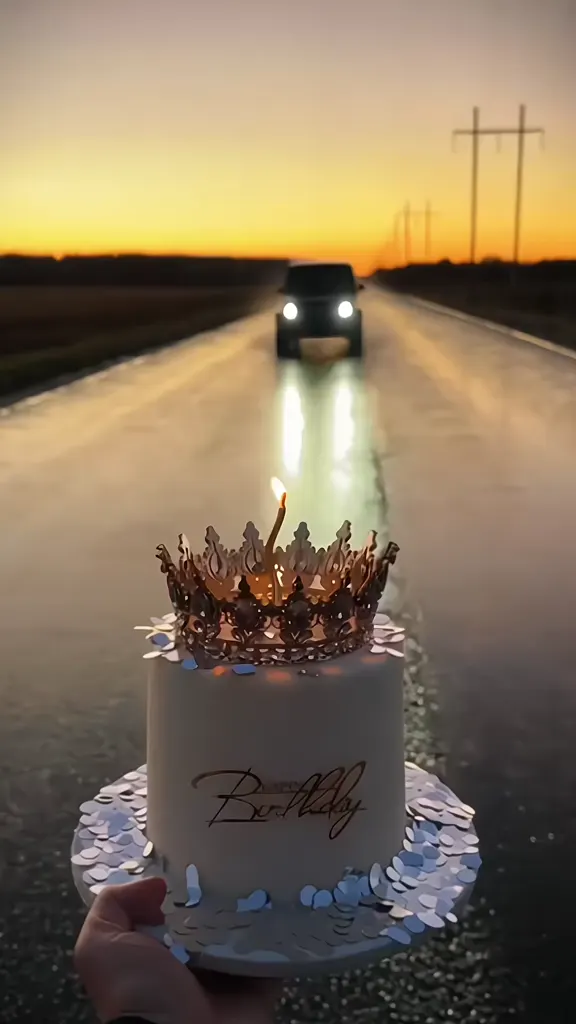
A cake held out at arm’s length on an empty road, twenty candles burning, and a car arriving to end them. That is the whole birthday car AI video: the driver’s window comes down, the driver leans out, one breath and every candle is out, and the picture freezes in black and white with Happy Birthday — or your age — written on it. It started on Instagram in October 2026 and turned into a CapCut template within four days. Pick one of the 9 takes below, upload one photo of your face, and the driver who leans out is you, with the take’s own sound still on it.
- 9 takes to remix
- One photo of you
- Cake, car and sound kept
- No watermark
Sexually explicit (NSFW) content is strictly prohibited.
Pick a sample
Rendering takes about 7 min. Finished clips land in History.
Birthday Car AI Takes to Remix
Every birthday car AI take is the same shot from the same place: a cake held out, the road behind it, a car arriving and the candles going out. So the choice is where it happens and how it ends — a highway at sunset, a wet city street, a desert lot with tire smoke, or a crown. Start with the take that made the trend, then pick the light you want your own face in.
The highway and the crown
@anne102333 on TikTokWet city street at dusk
@guzelka_prompt on TikTokCity after dark, window down
@user6091722966788 on TikTokPalms and a white G-Wagon
@esbih5ued0 on TikTokDowntown with a berry cake
@nihao9581 on TikTokDrift, and the age in the freeze
@themidnightmuseai on TikTokA field, an orange sky, dust
@efeitoiacapcut on TikTokSunset over a wet road
@khachromiummusic on TikTokThe original desert reel
View on TikTokWhat Is the Birthday Car AI Trend?
The birthday car AI video is a birthday shot from behind the cake instead of in front of it. Someone off camera holds a two-tier cake out at arm’s length, twenty tall candles lit, and the road behind it going gold. A car arrives — it drifts in, eases up or stops dead — the window is already down, and the person in the driver’s seat leans out, blows out every candle in one breath, and the picture freezes in black and white with Happy Birthday, or their age, written across it. Seven to nine seconds, vertical, no dialogue, one sound. Every birthday car AI take ends the same way.
The birthday car AI version started on Instagram on 5 October 2026 with @mira__98kr: a black SUV pulling up on a wet cobbled street at dusk, the driver leaning out to put the candles out, and a fade to black and white with Happy Birthday in white script. Instagram labels it as AI content, and by 28 October it had 38,806 likes and 6,156 comments. Four days later a Turkish tutorial turned the same effect into a CapCut AI template — arabada mum üfleme trendi, 9 October, 161,700 views — and the searches moved with it: birthday car AI, birthday candle driving effect, car drive to birthday cake.
The birthday car AI version that broke it open is the desert drift. On 28 October @udinu281 posted a dark-red SUV sliding through its own tire smoke on a desert lot at sunset, the driver leaning out to blow the candles out, It’s Raining Men underneath and Hello 43 written into the freeze: 94,195 likes in fifteen hours. That is where the three formats split. City night is the wet street, the black or maroon SUV and Happy Birthday in gold script. Desert drift is the dust, the smoke and your age in the freeze. The crown version is the friendliest of the three: the driver leans out and sets a small gold crown on the head of whoever is holding the cake, then blows the candles out.
What makes the birthday car AI trend work is that it is a birthday shoot with nothing to book. No car, no cake, no sunset, no friend willing to stand on a road holding dessert. You upload one clear photo of your face to the birthday car AI generator, and the model puts it on the driver who leans out of the window: your hair blowing as you lean, your face in the close-up over the candles, your face in the frozen frame at the end. The cake keeps its candles, the car keeps its colour, the timing keeps its beat, and the take’s own sound stays on the clip.
On TikTok almost everything under the phrase right now is a tutorial, which is why the post numbers look small and the template numbers do not. The CapCut template behind the crown version has been used around 29,600 times, roughly 1,450 a day, and the tutorials pushing it are in Russian, Turkish, Spanish, Filipino and English. On Google the phrase is only just getting pages of its own — a few tool sites, no established article — so most of the searching still happens inside TikTok. This page is the version that skips the template: you pick which take you want, your face is rendered inside it, and the MP4 comes out clean.
How to Make a Birthday Car AI Video
- 1
Pick the take you want to be in
The birthday car AI reference sits on the right. The opening take is the highway-and-crown version, which is the easiest to read. The city night take is the one the trend started with. The desert takes have the smoke and the age caption. If you only care about the light on your face, pick the field or the lakeside take.
- 2
Upload one photo of your face
Head and shoulders, straight on, well lit, eyes open — a plain photo rather than a filtered selfie. Your hair matters here more than on most trends, because it blows in the wind as you lean out, so do not crop it off. Sunglasses, a mask or a hat over the eyes will make the close-up over the candles fall apart.
- 3
Generate, then add the ending you want
Your birthday car AI video comes back vertical 9:16 with the take’s own sound and the black-and-white freeze already in it. Ask for your age in the prompt if you want HELLO 35 in the freeze instead of Happy Birthday, and ask for a second photo of your own car if you would rather arrive in that than in the SUV.
Tips for a Better Birthday Car Video
Keep your hair in the photo
In a birthday car AI video the driver leans out of a moving car, so the wind catches the hair — that is half of what makes the shot feel real. A photo cropped at the chin, or one where the hair is tied back tight and out of frame, gives the model nothing to blow around and the close-up looks pasted on.
One face, no sunglasses
The last seconds of every take are a close-up of the driver’s face over the candles. Sunglasses, a mask, a hand in front of the face or a heavy beauty filter all have to be guessed at, and the guess is what makes the face drift into someone else.
The cake is not your photo
You are uploading the driver, not the cake. Sending a picture of a birthday cake, or a photo of you holding one, confuses the two roles and the birthday car AI model tries to merge them. The hands and the cake in the foreground are part of the reference and stay exactly as they are.
Your own car is a second photo
If you want to arrive in your own car rather than the SUV in the take, add a second photo of it: the whole car, from the side or the front three-quarter, in daylight, with nothing parked in front of it. The model keeps the colour, the wheels and the grille, and it reads as yours.
Put your age in the freeze
Hello 43 and HELLO 35 are the same feature: the black-and-white frame at the end can carry a number instead of the words Happy Birthday. Say the number in the prompt. Without it the model defaults to Happy Birthday, which is the safer choice for a group post.
Pets make it land harder
A dog or a cat leaning out of the driver’s window and blowing out the candles gets reposted far more than another person does. Use one clear photo of the whole head, eyes open, and say "pet" in the prompt so the model does not give the animal a human face.
Label it as AI when you post it
The trend is a real birthday video with a rendered driver in it, and everyone in the comments asks which one is real. Use TikTok’s or Instagram’s AI-generated label — it costs nothing and it is the difference between a joke that lands and a comment section about deepfakes.
Pricing
Each birthday car AI video is one use (700 credits), whether you pick any length from 3 to 10 seconds. The price is on the button before you start, and nothing else is added.
A single use is $9.90; packs of 4 and 8 uses, or a monthly plan that posts trend videos to your accounts for you, cost less per video. A render that fails is refunded automatically.
Autopilot plans
Every month we turn the newest trends into meme videos and post them to your accounts. Each post is one of the plan’s videos, and any you make yourself come out of the same count. Cancel any time.
One-time video packs
Pay once and use them on any trend template, at any length. The credits never expire, and the other video tools can spend them too.
Use it responsibly
- Only upload photos of yourself, of people who said yes, or of your own pets.
- Do not use it to make someone look like they did something they did not.
- Label the result as AI when you post it; TikTok and Instagram both have an AI-generated tag.
- The birthday person in the photo has to be fine with being in it. A surprise video for someone who asked for it is the whole point of the trend; the same video for someone who did not is not a present.
- Do not put a friend or a public figure in a birthday video and post it as if they made it themselves.
Frequently Asked Questions
What is the birthday car AI trend?
A birthday video shot from behind the cake: someone holds a cake with lit candles out at arm’s length, a car pulls up or drifts in behind it, the driver leans out of the window and blows out every candle in one breath, and the picture freezes in black and white with Happy Birthday or the person’s age on it. The AI version puts your face on the driver, so the whole thing is made from one photo.
Is the birthday car video real or AI?
The candles, the cake and the car are AI. The trend came out of AI generation from the start: @mira__98kr’s first car version on 5 October 2026 is labelled as AI content by Instagram, and @udinu281’s desert drift on 28 October is the same. Some posts are real people holding real cakes in front of real cars, but the versions with a face over the candles that is clearly not the poster’s are generated.
How do I make a birthday car AI video?
Pick one of the takes on this page, upload one clear photo of your face, and generate. The model keeps the cake in the foreground, the car, the timing and the sound, and puts your face on the driver who leans out and blows out the candles. It takes one photo and about a minute; nothing has to be filmed.
What photo works best for the birthday car AI video?
One face, head and shoulders or closer, straight on, in good light, eyes open, with your hair visible. The last seconds are a close-up of the driver over the candles, so a photo where the face is small or turned away gives the model nothing to work with. No sunglasses, no mask, no heavy beauty filter, and only one person in the photo.
Do I need two photos?
No. One photo of your face is enough, and the driver is the person it puts in the window. A second photo is only for the version where you arrive in your own car: upload the car whole, from the side or the front three-quarter, in daylight. The hands holding the cake are part of the reference and never come from your photos.
Where did the birthday car trend start?
On Instagram, on 5 October 2026, with @mira__98kr: a black SUV on a wet city street at dusk, the candles blown out from the window and Happy Birthday in white script. It reached 38,806 likes and 6,156 comments by 28 October. A Turkish CapCut tutorial on 9 October turned it into a template, and on 28 October @udinu281’s desert drift took it to 94,195 likes in fifteen hours.
What is the Hello 43 text in the freeze?
It is the birthday person’s age, and it replaces Happy Birthday in the black-and-white last frame. The trend uses it because a number reads as a personal post rather than a card. Any number works — say yours in the prompt and the freeze carries it instead of the words.
Is there a birthday car AI CapCut template?
Yes, and it is what most of the tutorials are selling — the crown version has been used around 29,600 times, roughly 1,450 a day. A template pastes your photo onto one fixed clip, locks the face it was built around, adds its own watermark and only makes the version it was cut for. Here you pick which take to remix, the driver is rendered from your photo, and the file comes out clean.
What is the song in the birthday car AI videos?
Every take carries its own audio, and the two you will hear most are the sound the CapCut template ships with and It’s Raining Men, which is what @udinu281 used on the desert drift. You do not have to add either: the sound of the take you remix stays on the clip.
Is this the same as the car birthday trend?
No. The older car birthday trend — hashtagged carbirthdaytrend, sometimes called the run trend — is real footage of someone running out to a car with a cake on it, and searching birthday car mostly returns real cars given as presents. The birthday car AI trend is the cake POV: the cake is held towards the camera and the car brings the person who blows the candles out.
Can I put my pet in the birthday car AI video?
Yes, and it gets shared more than the human version. One clear photo of the pet’s head, eyes open, nothing covering the face; say "pet" in the prompt so it keeps the species, the fur and the markings instead of wearing a human face over the candles.
Why does my birthday car video look wrong?
Three things go wrong most often. The face changes between frames — usually a photo where the face is small, angled or half hidden, so the model improvises. The car changes colour — add a photo of the car you actually want if it matters. Or the cake comes out wrong — that happens when the uploaded photo also contains a cake, and the two get mixed up.
What is the Birthday Car AI prompt?
The city night prompt is in the AI Prompts section below. It starts: "Image 1 is the person in the car." Paste the rest into any AI video tool that accepts your photos.
One Photo, One Breath, Every Candle
Pick a take, upload one photo of your face, and blow out the candles from the driver’s window of your birthday car AI video — before everyone has seen the trend.
Make my birthday car videoMore Trends to Remix
Birthday Car AI Prompts
The remix prompt swaps the driver inside a birthday car AI clip. The five presets below are for the open generator: city night, desert drift, the crown, your own car, and your pet in the driver’s seat. Each one describes the cake in the foreground, the car arriving and the freeze at the end, so any image-to-video model that takes your photo as Image 1 can follow it.
City night
Image 1 is the person in the car. A vertical phone video, handheld at arm’s length, the birthday cake held up in the foreground so its lit candles fill the bottom third of the frame and the road or the street sits behind it, the light of golden hour or a lit-up city at dusk. Real phone footage, not a cartoon, no captions, no stickers, no logos and no watermark. A wet cobbled street at dusk between old buildings with lit shop windows, a two-tier white cake with gold lettering held out by two hands in the foreground, and a black luxury SUV easing up behind it. The driver leans out of the window and blows out every candle in one breath, then the picture fades to black and white with Happy Birthday written in white script near the end. The driver is the person in Image 1, with their own face, hair and skin tone in every frame. Audio: the traffic and the wind of the place, the candles going out in one puff, and nothing else.
Other versions: Desert drift · With the crown · Your own car · Your pet drives