
Boyfriend Makeup Prank Filter: Full Glam on His Photo, Step by Step
A girlfriend, a sleeping boyfriend and a full face of makeup — that is the whole prank, and it has been running on TikTok since 2020. In August 2026 the filter version took over: one photo of him goes in and he comes back with foundation, blush, lashes and a lipstick grin, applied step by step in ten seconds. Pick one of the 10 takes below, upload his photo, and AI puts him through the same makeover with the take’s own sound. He never has to sit still for it, and nothing ends up on the pillow.
- 10 takes to remix
- One photo of him
- Same reveal, same sound
- No watermark
Sexually explicit (NSFW) content is strictly prohibited.
Pick a sample
Rendering takes about 7 min. Finished clips land in History.
Boyfriend Makeup Prank Filter Takes to Remix
Almost every take is the same shot: one face held in frame and a makeover arriving in stages. So the choice is who and where. The first six are the filter wave itself — a man grinning through his own makeover. The last four were shot by hand, a real girlfriend working on a real boyfriend, which is where the pacing and the reveal come from. Pick the one closest to who you are putting in.
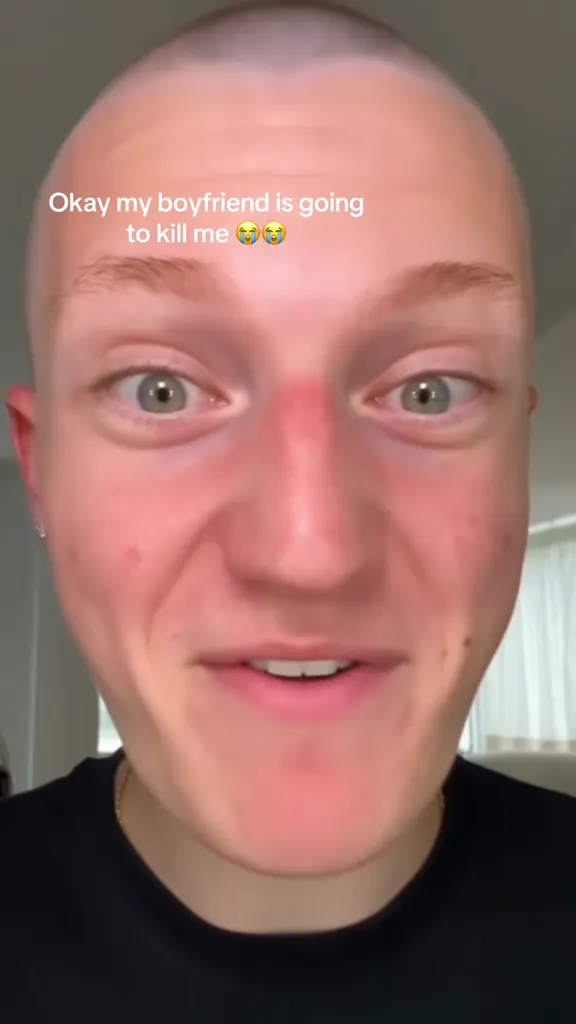
The boyfriend who is going to kill her
@capcutdailyuk on TikTokSo mad, in AirPods
@youngcapcutg on TikTokPranking my bf, take one
@filtercity6 on TikTokPranking my bf, take two
@filtercity6 on TikTokPatrizio, in the purple light
@ertoyz on TikTokMaroon cap, shirt off
@trendingtemplates6 on TikTokGlam, then a shrug
View on TikTokBare face to full glam
View on TikTokMakeup while he scrolls
View on TikTokLips done while he sleeps
View on TikTokWhat Is the Boyfriend Makeup Prank Filter?
The prank itself is simple: a girlfriend puts a full face of makeup on her boyfriend — while he sleeps, while he scrolls, while he patiently sits there — then hands him a mirror or turns the phone round and films what his face does. That version has been on TikTok since at least 2020 and never really stopped: sleeping-boyfriend makeovers, the mirror reveal, the reaction filmed from the next room. It is still the version most people picture when they hear the name.
In August 2026 the prank turned into a filter. Instead of a makeup kit you upload one photo of him, and the makeover is applied on the photo, step by step: foundation and concealer evened over the skin, brows filled in, a wash of blush, heavy eyeliner and lashes, and a glossy red lip at the end. Ten seconds, vertical, with the sound already attached. The CapCut template behind it has been used around 424,000 times — roughly 12,800 a day — and it is the version people now mean when they type boyfriend makeup prank filter.
The filter version spread because it removes every awkward part of the original. Nobody has to fall asleep on cue, no one has to hold still, nothing gets in his eyes, and there is no cleanup. The joke lands the same way, because the joke is the before-and-after: the face he actually has, then the same face in full glam. That is also why it travels outside couples — the brother, the dad, the flatmate, the best friend’s boyfriend, the dog and, on the meme accounts, whoever is in the news that week.
Typed into TikTok, the bare phrase completes "boyfriend makeup prank filter", "boyfriend makeup prank ai", "boyfriend makeup prank filter tutorial" and "boyfriend makeup prank effect", which is why this page is named after the filter wording. Google has barely caught up — the phrase returns a handful of TikTok pages and one tool page — so most of the search is still happening inside TikTok, on the sound.
This page is the swap. Pick any of the 10 takes below, upload one photo of his face, and the makeover comes back on your person instead: same steps, same framing, same sound, and a clean MP4 you can post without a CapCut logo on it.
How to Make a Boyfriend Makeup Prank Filter Video With AI
- 1
Pick a take
Choose the reference on the right. The opening take is the big reveal — the one with the shocked face at the end. The filter takes are the step-by-step makeovers. The single-face takes are the easiest to swap, because nothing else in the frame needs to change.
- 2
Upload one photo of him
A straight-on photo where his whole face is visible and well lit. A selfie is fine, a normal photo is better, and a photo where he is smiling is wasted — the joke reads best on a neutral face. Sunglasses, hands over the face or a heavy beauty filter all get in the way.
- 3
Generate and post
Your boyfriend makeup prank filter video comes out vertical 9:16 with the take’s own sound already in it, so it lands on the same audio as the rest of the trend. Show him the result and film his face — that reaction is the second half of the prank.
Tips for a Better Boyfriend Makeup Prank
One face, filling the frame
The boyfriend makeup prank filter only works when his face is the subject. A photo where he is one of five people at a table, or where his head is a tenth of the picture, gives the model nothing to paint on. Crop to the head and shoulders before uploading.
Neutral beats smiling
The reveal lands because he looks unimpressed. A photo where he is already pulling a face, mid-laugh or looking away makes the makeup look like a costume instead of a prank. Straight-on, flat expression, eyes open.
No beauty filter on the source photo
If the photo was taken inside a smoothing filter or an older selfie app, the model has to guess what his skin actually looks like and the result drifts into someone else. Use the plainest photo you have.
Pets work, and land harder
The same steps on a dog or a cat read as comedy rather than a prank, and the model keeps the fur and markings. Say "pet" in the prompt so it does not give the animal a human face — the version people repost most is a cat in red lipstick.
Pick the take that matches the reveal
If you want the shocked-face ending, use a take that already ends on the reaction. If you only want the makeover, use a filter take and stop there. Mixing a reaction take with a photo where he is asleep reads as two different people.
He has to say yes
The joke only survives if the person in the photo is fine with it. A boyfriend who agreed to the prank is funny; a colleague, an ex or someone you do not know is not, and posting it without the label gets the account reported rather than shared.
Pricing
Each boyfriend makeup prank filter video is one use (700 credits), whether you pick 10, 13 or 15 seconds. The price is on the button before you start, and nothing else is added.
A single use is $9.90; packs of 4 and 8 uses, or a monthly plan that posts trend videos to your accounts for you, cost less per video. A render that fails is refunded automatically.
Autopilot plans
Every month we turn the newest trends into meme videos and post them to your accounts. Each post is one of the plan’s videos, and any you make yourself come out of the same count. Cancel any time.
One-time video packs
Pay once and use them on any trend template, at any length. The credits never expire, and the other video tools can spend them too.
Use it responsibly
- Only upload photos of yourself, of people who said yes, or of your own pets.
- Do not use it to make someone look like they did something they did not.
- Label the result as AI when you post it; TikTok and Instagram both have an AI-generated tag.
- Ask the person in the photo first. A prank with a boyfriend who is in on it is the meme; the same clip with someone who is not is a problem.
- Do not put the filter on a named public figure and present it as real footage of them.
Frequently Asked Questions
What is the boyfriend makeup prank filter?
A filter that applies a full face of glam makeup to a photo of your boyfriend in about ten seconds: foundation, brows, blush, eyeliner and lashes, then a red lipstick grin, all in stages. It is the photo version of the older prank where a girlfriend does real makeup on her sleeping or distracted boyfriend and films his reaction.
Is the boyfriend makeup prank real or AI?
Both versions exist. The posts from 2020 to 2025 are real: real makeup, a real boyfriend, a real mirror and a real reaction, which is why they have the biggest numbers. Everything under "boyfriend makeup prank filter" and "boyfriend makeup prank ai" is generated from a photo. A post with TikTok’s AI-generated label is one of the generated ones.
How do I do the boyfriend makeup prank on my boyfriend?
The real way: wait until he is asleep or scrolling, do the makeup fast and quietly, then hand him a mirror or turn the front camera on him. The boyfriend makeup prank filter way: pick a take on this page, upload one photo of his face, generate, then show him the video and film his face. The filter version takes a minute and needs no kit.
What is the "too faced" filter everyone mentions?
The tutorials call it the Too Faced filter because the look it paints on — full coverage base, heavy lashes and a bold lip — is the brand’s signature glam. It is not an official Too Faced product or an in-app effect; it is a CapCut template that other people have copied. A separate search for "too faced filter" mostly returns the brand’s own makeup, which is a different thing.
Can I use it on my husband, my brother or my dad?
Yes, and those are the versions that do well — the joke is not really about romance, it is about a face that would never wear this much makeup. What matters is that the person agreed to it. A husband or a brother who is in on the prank is fine; a colleague or a stranger is not.
Does it work with a pet photo?
Yes. A dog or a cat takes the same steps — blush, lashes, a red lip — and keeps its own fur, markings and eyes, which is why the cat-in-lipstick boyfriend makeup prank filter version gets reposted so much. Say "pet" in the prompt so the model does not give the animal a human face.
What photo works best?
One face, well lit, straight on, eyes open, no sunglasses and no heavy beauty filter. Head and shoulders is plenty. A photo where he is smiling, looking away or partly out of frame gives the model less to work with and the result drifts away from his actual face.
How long is the video, and does it have sound?
The boyfriend makeup prank filter videos on this page run from five to fifteen seconds, and each one carries its own sound — the room noise and the reaction at the end — so nothing has to be added afterwards. The video comes out vertical 9:16, ready for TikTok, Reels or Shorts.
Is there a free CapCut template for it?
There are several, and they have been used hundreds of thousands of times, but a CapCut template for the boyfriend makeup prank filter pastes your photo onto one fixed clip, adds its own watermark and locks the face it was built around. Here you pick which take to remix, the face is rendered from your photo inside that clip, and you get a clean MP4 with no logo.
Why is it called a filter if it is a video?
Because it started as an in-app effect people applied live, and the name stuck when the boyfriend makeup prank filter look moved into video generators. Nothing about the result is a live filter any more — it is a rendered clip you can download, and it does not need the app that made it.
What is the Boyfriend Makeup Prank Filter AI prompt?
The full glam, step by step prompt is in the AI Prompts section below. It starts: "Image 1 is the boyfriend." Paste the rest into any AI video tool that accepts your photos.
He Is Not Going to Like It
Pick a take, upload one photo of his face, and post your boyfriend makeup prank while the filter is still everywhere.
Make my makeup prank videoMore Trends to Remix
Boyfriend Makeup Prank Filter AI Prompts
The prompt behind every take on this page: the remix prompt that swaps the person inside a clip, and four text prompts for the open generator — full glam, lipstick and lashes only, the sleeping version and the pet version. They describe the makeover step by step, so they work in any image-to-video model that takes your photo as Image 1.
Full glam, step by step
Image 1 is the boyfriend. A vertical phone video, a close, steady shot on the face at eye level, the room behind him soft and out of focus, ordinary daylight. Crisp and real, like a phone video, not a cartoon. No captions, no stickers, no logos, no watermark. He sits facing the camera in a living room, half-lidded and unaware, and a full face of makeup is applied on him in stages: foundation smoothed over the skin, brows filled, pink blush, black eyeliner and lashes, and a glossy red lip at the end. His own features stay exactly as in Image 1 and he blinks, deadpan, at the last step. Audio: the take’s own sound — the muffled background noise of a room and a small reaction at the end.
Other versions: Just the lips and lashes · While he is asleep · Your pet instead