
Enchantress Filter: A Black Hand, a Crescent Crown, Your Face
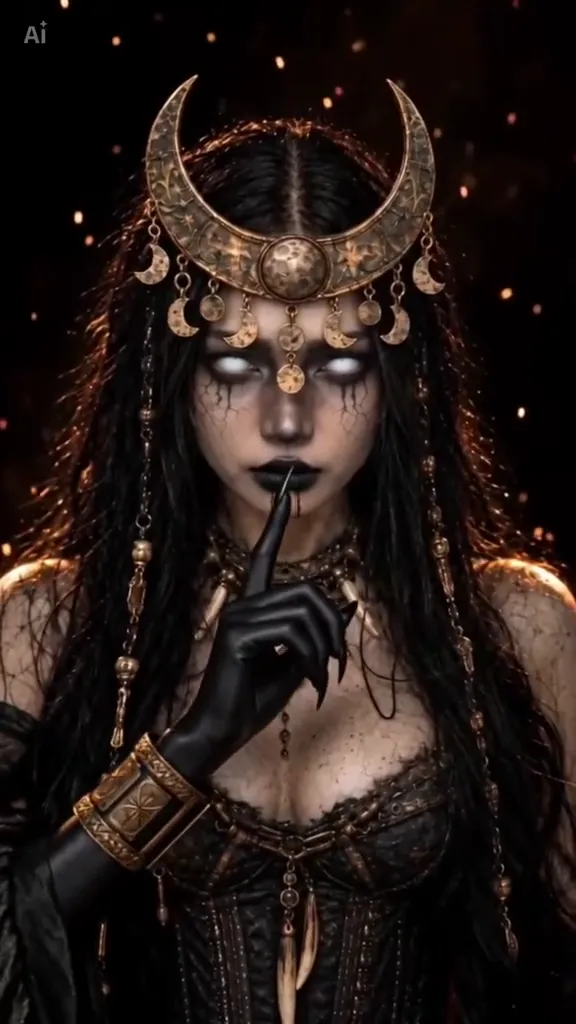
The enchantress filter is the Halloween post the CapCut wave is built on. You hold one hand out to the camera, a black clawed hand rises, laces its fingers through yours and closes — the glove creeps up your arm — and the person who looks back has a gold crescent crown, glowing white eyes, black tears and one finger on her lips. Pick a clip below, add one photo, and AI puts your face, a friend’s face or whoever you want under that crown; the claw, the crown, the drifting gold sparks and the sound stay exactly where they are.
- One photo
- About 10 seconds
- The hand hides the cut
- Sound kept
Sexually explicit (NSFW) content is strictly prohibited.
Pick a sample
Rendering takes about 7 min. Finished clips land in History.
Enchantress Filter Examples
Eleven enchantress filter clips, from the biggest render on TikTok to the green-coven variant and a night-street version with ink crawling on the hand. The people change — glasses, braids, a blonde in a slip top, a Filipino girl in a black top — and the hand, the crown and the sparks do not. Pick the face and the look you want the AI to put your photo into.
A hand out, then the claw
@queenkatrina777 on TikTokBraids down to the waist
@capcut.templates1026 on TikTokThe claw pressed to the lens
@artemiscc_capcut on TikTokThe version with glasses
View on TikTokGrey tee, black lace
@capcutviraleffects on TikTokEnchantress Filter 2: you wake up as her
@capcut.templates5031 on TikTokHand out, crown down
@artemiscc_capcut on TikTokLong hair under the moon charms
@capcutaiengine on TikTokFive fingers, then a glove
@capcut.templates5031 on TikTokThe green coven version
@ver0nique3001 on TikTokStreet outfit, ink on the hand
View on TikTokWhat Is the Enchantress Filter?
The enchantress filter is a one-photo Halloween transformation with a very specific first move: you hold a hand out to the camera, a black clawed hand rises and closes over it, and your hand becomes a glossy black glove. On the cut you are the enchantress — a gold crescent-moon crown hung with little moon charms, a black lace corset, glowing white eyes with black tears running from them, black lips, and one gloved finger on your lips. It runs about ten seconds, always vertical, and the room behind you is not a room at all: a black void with gold sparks drifting through it.
Almost everything posted under the name comes from one CapCut template. “Enchantress Filter 1”, made by ArtemisCC, has around 24,000 uses, and the wave and its topic start on 2026-10-16; a second one, “Enchantress Filter 2”, opens on “POV: you wake up as the Enchantress” and ends on the same crown. The topic is adding about 200 videos a day, and the biggest posts are not the template itself but Spanish CapCut resellers cutting two renders and a screen recording together — one past 810K plays, another past 466K — which is why “filtro hechicera”, “filtro de hechicera” and “mano de Hécate” (the hand of Hecate) all point at the same ten seconds.
Here the template is not something you go and find. Each clip in the gallery is the effect itself, and the video workbench takes one photo and swaps the person in it: your face, a friend’s, whoever says yes. The claw, the glove, the crown, the tears and the sound stay where they are. That is the difference between this page and a tool that only promises a witch picture — you can see eleven finished results first, pick the one whose hand and crown you want, and change only the face.
Three things people confuse it with. The witch filter effect on this site is the golden-smoke one: pointed hat, plum cloak, a candle-lit stone room and carved pumpkins — no hat, no smoke and no pumpkins here, and no candle-lit room either. The Enchantress from Suicide Squad is a movie character, and the huge wave of posts that dress up as her are real makeup and cosplay, not AI. And “enchantress” on its own is a load of other things: a Cookie Run character called Dark Enchantress, a Marvel villain, lash clusters sold under the name. This page is the filter: the claw, the crown and the glove.
How to Make the Enchantress Filter
- 1
Pick the hand you want
The gold crescent crown, the horned queen, the green coven or the two-person version. The claw, the crown, the sparks and the sound all come from the clip you pick, and the clip is as long as it is on the page.
- 2
Add one photo with a hand in it
Yourself, a friend, anyone who agreed. Head and shoulders, one hand held out toward the camera, even light, no sunglasses. The effect keeps the same face under the crown, so a clear, flatlit photo is what makes the reveal land.
- 3
Create and post
The clip comes back at the sample’s own length with the template’s sound on it, ready for TikTok or Reels with #enchantressfilter and #halloween. Download the MP4 and switch on the AI-generated label.
Tips for an Enchantress Filter That Reads as You
The hand is half the shot
The clip opens on a hand held toward the lens, so that is what the model needs from the photo. Palm down or fingers spread, at chest height, the whole hand in frame. A portrait with both hands out of shot makes the claw arrive out of nowhere.
Your background disappears
The template puts you in a black void, so a kitchen, a bedroom or a bright street all end up looking the same. That means you can shoot this at 11pm on a phone; there is nothing to tidy up behind you.
Long hair, glasses, a beard
Loose hair reads best with the moon charms, and glasses work as long as you say to keep them in the first half — the sample with glasses does exactly that. A beard is fine too: the crown and the lace do the work, the face stays yours.
Ten seconds, no filming
Nothing here needs you to act: the claw, the glove, the tears and the finger on the lips are all in the clip. You supply one still photo, and the only choice that changes the result is which clip you started from.
Pricing
Each enchantress filter video is one use (700 credits), whether you pick 5, 9 or 10 seconds. The price is on the button before you start, and nothing else is added.
A single use is $9.90; packs of 4 and 8 uses, or a monthly plan that posts trend videos to your accounts for you, cost less per video. A render that fails is refunded automatically.
Autopilot plans
Every month we turn the newest trends into meme videos and post them to your accounts. Each post is one of the plan’s videos, and any you make yourself come out of the same count. Cancel any time.
One-time video packs
Pay once and use them on any trend template, at any length. The credits never expire, and the other video tools can spend them too.
Use it responsibly
- Only upload photos of yourself, of people who said yes, or of your own pets.
- Do not use it to make someone look like they did something they did not.
- Label the result as AI when you post it; TikTok and Instagram both have an AI-generated tag.
- A crown and black tears on someone else’s face is still their face — ask before you upload a friend’s photo.
Frequently Asked Questions
What is the enchantress filter on TikTok?
It is a one-photo Halloween transformation: you hold a hand out, a black clawed hand closes over it and turns it into a black glove, and on the cut you are a dark-moon witch with a gold crescent crown, glowing white eyes and black tears. The clip is about ten seconds, vertical, and the room behind you is a black void. Most posts use a CapCut template called Enchantress Filter 1, made by ArtemisCC, which is past 24,000 uses.
How do I use the enchantress filter with my own photo?
Pick a clip on this page, upload one photo with a hand held out, and create. AI replaces the person in the clip with the person in your photo and keeps the claw, the crown, the glove and the original sound, so you get the effect without hunting down the template in CapCut.
What happened to the enchantress filter?
Nothing has been taken down: this was never a filter in TikTok’s effects tab that could be unpublished, it is a CapCut template, and the template is still live. What goes missing is the link. Template resellers repost the same effect under new names, the original listing slides down the search, and the video you saved stops pointing anywhere useful. The clips themselves are still everywhere — the topic adds around 200 a day — and every sample on this page is one of them, so nothing here depends on a listing staying put.
Is the enchantress filter still available?
Yes, in two places: the CapCut templates Enchantress Filter 1 and Enchantress Filter 2, both still live, and this page, where the same effect is a reference clip plus your photo. If a search inside CapCut comes up empty, the listing is usually buried under the resellers’ copies rather than gone — searching “enchantress filter 1”, or the author’s page, ArtemisCC, finds it.
Is the enchantress filter the same as the witch filter?
No. The witch filter effect is golden smoke, a tall pointed hat, a plum cloak and a candle-lit stone room with carved pumpkins. This one has no hat, no smoke and no room: it is a black void, a clawed hand taking yours, a gold crescent crown, black tears and a finger on the lips. If the one you want is the hat and the pumpkins, that is the witch filter effect page.
Is the enchantress filter the same as Enchantress from Suicide Squad?
No, though the two share a name and a season. The Suicide Squad Enchantress is a movie character, and the huge wave of posts dressing up as her — the makeup transitions past 15M plays — are real makeup and cosplay. It is AI: your photo goes into a clip and comes back crowned. The movie character never wears this crescent crown.
Is “filtro hechicera” the same thing?
Yes. “Filtro hechicera”, “filtro de hechicera” and “filtro hechicera 1” are the Spanish names for this effect, and “mano de Hécate” — the hand of Hecate — is what the clawed hand part is called. A lot of the most-played posts in the wave are Spanish-language CapCut resellers, so the same ten seconds travels under both names.
What is the Enchantress Filter 1 vs Enchantress Filter 2?
They are two CapCut templates with the same ending. Enchantress Filter 1 is the original: one photo, the hand, the crown. Enchantress Filter 2 opens on “POV: you wake up as the Enchantress” and uses a slightly different opening frame before the same claw and the same gold crescent. Both are 10 seconds and both are in the gallery here.
Can I use a photo of my cat or my dog?
You can try, but this wave has no pet versions: every post is a person holding a human hand out, and the claw is built for that. For a pet in a witch hat and cloak, the witch filter effect page is the one with cat and dog samples. Here, a photo of yourself or a friend is what the template expects.
Does the enchantress filter work on a man?
The wave is almost entirely women, and the men’s versions that exist are hand-made edits rather than template output. The prompt on this page does work on a man — keep the beard, put the crown on him and the lace becomes a black jacket — but expect the result to look like a male version of the look rather than a copy of the clips in the gallery.
What is the Enchantress Filter AI prompt?
The dark moon crown prompt is in the AI Prompts section below. It starts: "Image 1 is the person." Paste the rest into any AI video tool that accepts your photos.
Who Do You Want Under the Crown?
One photo, one clawed hand, ten seconds — you get a clip with the crown, the tears and the sound already on it.
Make my enchantress videoMore Trends to Remix
Witch Filter Effect
Nightwing Trend
Halloween Transition
Pumpkin Head Trend
I'm Sorry I Lied Trend
Venom Car Trend
Boyfriend Makeup Prank Filter
Birthday Car AI
AI Prompts for the Enchantress Filter
The prompt behind each version, for any image-to-video model that takes a reference photo. All of them describe the same three beats — the hand held out, the claw closing over it, the crown on the cut — and change only the look on the other side of the cut.
Dark moon crown
Image 1 is the person. A vertical 9:16 phone video. They hold one hand out toward the lens, palm down, at chest height. A black, clawed hand rises from the bottom of the frame, laces its fingers through theirs and closes; where it holds them the skin turns into a glossy black glove that creeps up the wrist. Cut on the glove: On the cut the same person is the enchantress: a gold crescent-moon crown hung with little moon charms, a black lace corset, a choker of small bones, glowing white eyes with black tears running from them, black lips, and black gloves to the elbow. They lift the gloved hand and set one finger on their lips. The background is pure black with gold motes drifting in the air, no room and no props. Keep the face, hair colour, skin tone and build exactly as in the photo, so it is plainly the same person before and after the hand. No text, no logos. Audio: a low drone that stops dead on the cut, then a slow dark Halloween track with a single bell.
Other versions: Green coven · Horned queen · Two of you, one claw