
Chinaza Dynamic Filter: One Photo, and It Sings Back at You
The Chinaza dynamic filter takes a single photo and gives it fourteen seconds of life: the people in it lean into the lens, laugh, fling their arms open and point at the camera, in the room, garden or street the photo was taken in. Pick a clip below, upload a photo of yourself, the two of you, your baby or your pet, and AI plays the routine with them, with the sound kept.
- 15 clips to remix
- One photo, or two
- Babies, dogs and cats
- Keeps the sound
- No watermark
Sexually explicit (NSFW) content is strictly prohibited.
Pick a sample
Rendering takes about 7 min. Finished clips land in History.
Chinaza Dynamic Filter Examples
Fifteen Chinaza dynamic filter clips, most liked first: the girl in the party dress and the boy in the Spider-Man shirt that carried the trend, the toddler and the baby, the cats and the dogs doing it on their paws, the man in the red apron, and the two of them laughing into the lens. Pick one, add a photo, and your face is the one singing.
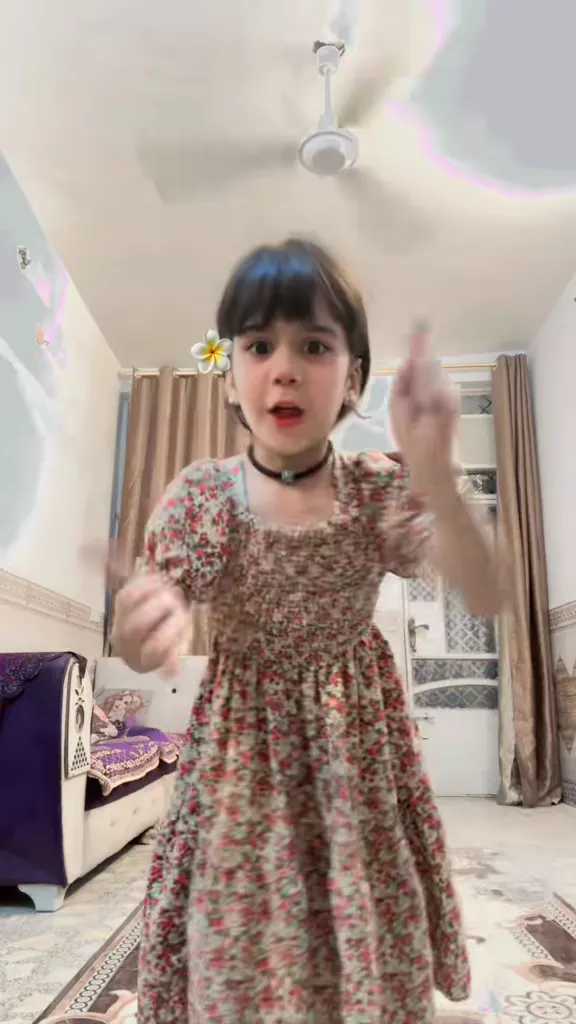
The girl in the party dress
@mwmw.55 on TikTokThe boy in the Spider-Man shirt
@martaatzori1 on TikTokThe black cat, paw out
@elbooboosoy on TikTokPyjamas, on the bed
@mariagarcia900766 on TikTokThe toddler in cherry pyjamas
@enukcchhx78 on TikTokSueño has a problem
@judithforestier on TikTokThe man in the red apron
@dennyraymidkiff on TikTokMy cat is upset
@kamylady_ on TikTokOn the street, in a striped polo
@.sultanov.1 on TikTokThe tabby on a chair
@anthonyperez99876 on TikTokThe brother and sister
@nerminyasin7 on TikTokTwo shepherds in gold chains
@evita333dinamita on TikTokDenim jacket, outdoors
@irishkaribka10 on TikTokThe two of them at the beach
View on TikTokA baby takes over the lens
View on TikTokWhat Is the Chinaza Dynamic Filter?
The Chinaza dynamic filter is a one-photo effect. You send a single picture, and about fourteen seconds later the people in it are moving: one of them leans into the lens laughing, throws both arms open, points at the camera with one finger and then the other, and ends with the hands clasped under the chin, lips moving on the beat the whole time. The room, the garden, the street, whatever was behind them in the photo, stays where it was. It runs vertical, it carries the trend’s own upbeat sound, and it is built to be posted, not edited.
It is not one of TikTok’s camera filters and it is not in the effects tray. On TikTok the Chinaza dynamic filter travels as a CapCut template, and the posts that fill the search results are mostly tutorial accounts repasting the same template link: search the name and you get hundreds of “how to make it” videos and very few of the clips themselves. The template the tutorials point at has been used 162.89K times. Underneath, the clips all run on one sound, the same one the Imael Angel Bad Times trend uses; the difference is what is in front of the camera, a still photo brought to life here, people filming themselves there. So the Chinaza dynamic filter is the photo version of that trend, and the tutorial accounts are the only reason it looks like a CapCut problem.
This page skips the template hunt, which is the part of the Chinaza dynamic filter nobody enjoys. Every clip below is a reference you can remix: pick the one whose scene and rhythm suit your photo, upload the photo, and the AI keeps your face, hair and clothes and plays the same lean, laugh, point and clasp in the same setting. One photo gives you one person; two photos and a two-person clip gives you both. The routine is funny on almost anything with a face, which is why the pets and the toddlers are in here: a black-and-white cat, two German shepherds in gold chains, a baby in a onesie.
How to Do the Chinaza Dynamic Filter
- 1
Pick a clip
One person, a couple, a toddler, a cat or a dog, a street or a living room. The clip you choose supplies the scene, the camera, the timing and the sound; your photo supplies who is in it, and the Chinaza dynamic filter routine is already in the prompt.
- 2
Upload your photo
A clear photo of the person or animal, waist up or further back so there is room for the arms once they start swinging. For a two-person clip, add a photo of each. The routine is already written: lean in, laugh, arms open, point, hands clasped.
- 3
Make it and post it
The render comes back vertical, at the clip’s own length, with the sound on it and no watermark, so your Chinaza dynamic filter clip goes straight to TikTok under #chinazafilter, or to Reels and Shorts.
Tips for a Better Chinaza Dynamic Filter Clip
Leave room around the arms
The routine starts with both arms thrown open, so a photo cropped tight at the elbows gives the AI nowhere to put them. A waist-up or full-length shot with some space either side keeps the swing readable, and the Chinaza dynamic filter stays on the person instead of the crop.
One clear face per person
Front-facing, evenly lit, no sunglasses and nothing covering the mouth: the joke is the singing face, and a photo where the mouth is hidden gives you a stiff clip. For two people, a single photo of both works better than two separate portraits.
Match the clip to your photo
Your photo’s own background stays, so pick a clip whose scene is close to it: the party dress clip for a living room, the apron clip for a kitchen or a bar, the pyjama clip for a bedroom. Then the two halves look like one shot, which is what sells a Chinaza dynamic filter clip.
Pets read best sitting up
The cat and dog versions only work when the animal can sit up and show its front paws. Photograph it on its hind legs, whole body in frame, mouth slightly open if you can, and it will do the pointing instead of you: the pet version is the funniest corner of the Chinaza dynamic filter.
Pricing
Each Chinaza dynamic filter video is one use (700 credits), whether you pick 14 or 15 seconds. The price is on the button before you start, and nothing else is added.
A single use is $9.90; packs of 4 and 8 uses, or a monthly plan that posts trend videos to your accounts for you, cost less per video. A render that fails is refunded automatically.
Autopilot plans
Every month we turn the newest trends into meme videos and post them to your accounts. Each post is one of the plan’s videos, and any you make yourself come out of the same count. Cancel any time.
One-time video packs
Pay once and use them on any trend template, at any length. The credits never expire, and the other video tools can spend them too.
Use it responsibly
- Only upload photos of yourself, of people who said yes, or of your own pets.
- Do not use it to make someone look like they did something they did not.
- Label the result as AI when you post it; TikTok and Instagram both have an AI-generated tag.
Frequently Asked Questions
What is the Chinaza dynamic filter?
It is a one-photo TikTok effect: you send a picture of one or more people, and it comes back as a short vertical clip of them leaning into the camera laughing, throwing their arms open and pointing at the lens on the beat, in the same room or street. On TikTok it spreads as a CapCut template; here you pick one of the clips above, upload your photo and the AI puts you in it.
Where did the Chinaza dynamic filter come from?
It came up through CapCut rather than through TikTok’s own effects. A template that turns one photo into the fourteen-second routine started being reposted by tutorial accounts in late September 2026, and the template has been used 162.89K times; search the name on TikTok today and most of the results are those tutorials pointing at the same link, with the clips themselves scattered in between. That is also why people search for “chinaza dynamic filter original”: the tutorials bury the actual videos.
Who is Chinaza?
The name is the filter’s own label, and the effect is all it refers to here. Typed on its own it is an Igbo name, so TikTok and Google also turn up a Nigerian creator’s account and the actor Chinaza Uche, neither of which has anything to do with the effect, and Google’s suggestions for “chinaza” go straight to Uche’s films and series.
Do I need the CapCut template to do it?
No. The template only does the same thing this page does: it puts your photo through an image-to-video model with the routine baked in. Here the routine is written out in plain English and shown on the page, the clip you pick is the motion reference, and nothing has to be installed or exported from an editing app.
What is the sound in the Chinaza dynamic filter?
The clips all run on one sound, “original sound – mohamedhaba11”, which has been used on 37.7K videos and is the same audio the Imael Angel Bad Times trend runs on. Remixing a clip keeps that sound attached to it, so the Chinaza dynamic filter video you make arrives with the audio already on it.
Can I use a photo of two people, a baby or my pet?
Yes to all three. A couple needs one photo with both people in it, or a photo per person, and a two-person clip such as the beach one so they both move; a baby photo works on the toddler and baby clips, and a cat or dog photo works on the clips where the animal sits up and points, which is most of the pet ones on this page.
Is the Chinaza dynamic filter free?
One video is one use, 700 credits, at 14 or 15 seconds. A single use is $9.90, and packs of 4 and 8 cost less per video. Failed renders are refunded. A render that fails is refunded, and the price is on the button before you start.
Is the Chinaza filter real or AI?
AI. Nobody in these clips is really leaning in and singing: the photo is the first frame and a video model invents the movement, which is why the routine is identical from clip to clip and why the mouth shapes never quite match the words. Label your result as AI when you post it.
Can I use a group photo?
Yes, as long as everyone in it is doing the same routine. Pick a clip with the same number of people, or use the “Everyone in the photo” prompt, which has the people in front lead and the ones behind follow a beat later. Faces further back get less detail, so a photo where nobody is tiny in the corner works best; that is true of any Chinaza dynamic filter clip with more than one person in it.
What is the difference between this and the Bad Times trend?
Same sound, different joke. In the Bad Times trend real people film themselves lip-syncing and picking a fight with the camera; here the movement comes out of a still photo, so the person, the baby or the pet in your picture is the one performing, in the place the picture was taken.
What is the Chinaza Dynamic Filter AI prompt?
The one photo of you prompt is in the AI Prompts section below. It starts: "Image 1 is the person or pet from the photo; Image 2, if given, is the second person in a two-person clip." Paste the rest into any AI video tool that accepts your photos.
Make Your Photo Sing It Back
One photo, fourteen seconds, and the people in it lean in, laugh and point at whoever is watching. That is the whole Chinaza dynamic filter.
Bring my photo to lifeMore Trends to Remix
Imael Angel Bad Times
Hotel Lobby AI
Shaking Head Trend
Twilight Baseball Scene AI
Boyfriend Makeup Prank Filter
Whiny Dog AI
Witch Filter Effect
Raindance AI
Chinaza Dynamic Filter AI Prompts
The prompts behind a solo photo, a couple, a baby, a cat or dog and a whole group photo. Each one spells out the routine beat by beat, so you can change a gesture, a camera angle or a scene and keep the rest. They work in any image-to-video model that takes a reference photo.
One photo of you
Image 1 is the person or pet from the photo; Image 2, if given, is the second person in a two-person clip. A still photo of one person becomes a clip: The person from Image 1 leans into the lens laughing with the mouth open as if belting out the line, straightens up, flings both arms open wide, swings them down, points at the camera with one finger, then with the other hand, and finishes with both hands clasped under the chin. Keep every face, hairstyle, skin tone, outfit and body shape from the photos, and if the photo is of an animal, keep its species, breed, fur colour, markings and eye colour and let it play the same part with its front paws. Vertical 9:16 phone footage in the scene and background of the photo, camera handheld but steady at chest height, natural light, photorealistic, no text, no logos, no captions. Audio: an upbeat pop clip with a woman singing the hook, no other dialogue.
Other versions: The two of you · Your baby · Your dog or cat · Everyone in the photo