
Angry Dance Filter: One Photo and the Angry Dance AI Video
The angry dance filter takes one photo and gives back fifteen seconds of that person losing an argument with the camera: finger jabs at the lens, an open palm shoved at it, a hand on the hip, one last shout. Pick a version below — the Jim Carrey look-alike, Jack Sparrow, Mike Tyson, the cat, the corgi — add a photo, and AI puts you inside that clip with the Bad Times sound still on it. That is the whole workflow.
- One photo
- 15 seconds, 9:16
- Keeps the sound
- No watermark
Sexually explicit (NSFW) content is strictly prohibited.
Pick a sample
Rendering takes about 7 min. Finished clips land in History.
Angry Dance Filter Videos to Remix
Fourteen versions of the same fifteen seconds, the two biggest TikTok cuts first and the pets in between: the Jim Carrey look-alike the template ships, a guardian angel, a grey cat and a corgi doing it on their hind legs, Jack Sparrow, Mike Tyson, a woman in a black dress in a garden, and the clean widescreen take at the end. Pick the one whose room, light and outfit fit your photo — that clip becomes the reference for your angry dance filter video, moves and sound included.
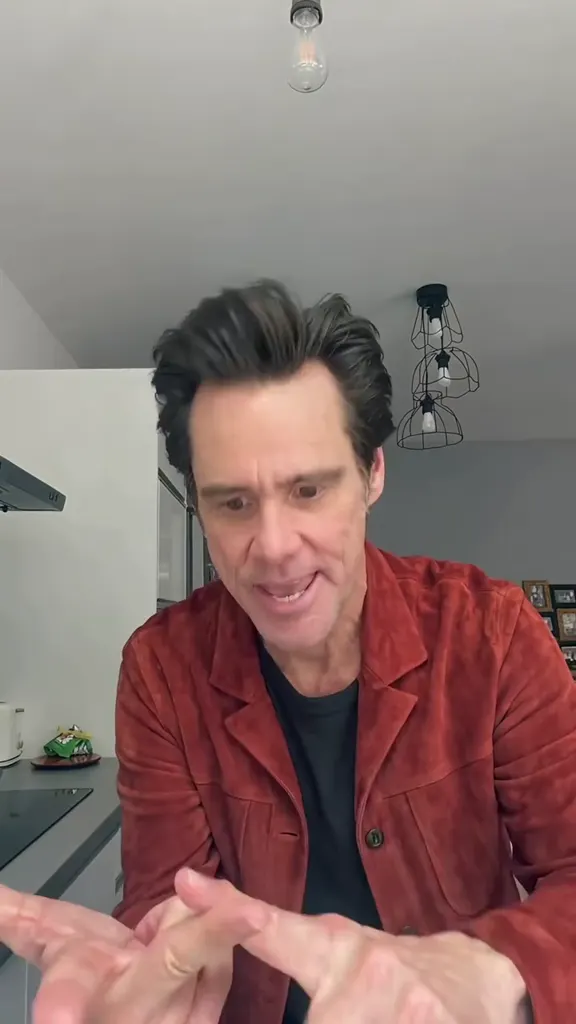
The Jim Carrey look-alike, kitchen and all
View on TikTokA guardian angel who has had enough
@jesus.found.you on TikTokThe grey cat, paws and all
View on TikTokJack Sparrow in the kitchen
View on TikTokMike Tyson pointing at you
View on TikTokThe corgi version
View on TikTokRed hoodie, real kitchen
@capcutmotion14 on TikTokBlack dress, garden light
View on TikTokThe plain-wall cut
@green.scream.memes on TikTokGrey beard, black tee
View on TikTokYellow jacket, five seconds
View on TikTokLeather jacket, five seconds
View on TikTokA Jedi in the kitchen
View on TikTokThe widescreen take
View on TikTokWhat Is the Angry Dance Filter?
The angry dance filter is a one-photo trend: you upload a still picture and get back about fifteen seconds of vertical video of that person — or that cat, or that dog — losing an argument with the camera in a bright kitchen, set to “Bad Times” by Imael Angel.
They walk in already annoyed, jab both index fingers at the lens, shove an open palm at it, flap a hand by the face, turn away with a hand on the hip and swing back for one last shout. Nobody films themselves and nobody learns the moves.
It is the photo route of the Bad Times trend, and the two names are both new. People had been acting the argument out to the song since August 2026; the photo template that drops a face onto the routine arrived around 1 October, and from about 19 October captions started calling it the angry dance filter. The two CapCut copies of that template each show around 60,000 uses and were adding roughly 20,000 a day in the last week of October, which is why the same kitchen keeps turning up in everybody’s feed even though most individual posts sit under a few thousand plays. The videos are mostly posted by template-reselling accounts, so the plays stay small while the template itself is enormous.
The face most people picture is a Jim Carrey look-alike in a rust-red suede jacket, and that is where the search phrase “Jim Carrey pointing finger” comes from. It is not a clip of Jim Carrey: the face is generated, and the template swaps it for whatever photo it is handed. That is why Jack Sparrow, a winged angel, Mike Tyson and a corgi all end up in the same room doing the same six moves — the identity is the variable, everything else is the template.
What makes it a meme rather than a filter is the contrast. The routine is not really a dance; it is a mimed argument, and the person doing it stays furious the whole way through while committing completely to the bit. The palm shoved into the lens is the frame everyone screenshots, and the last close-up shout is the one that gets a clip reposted.
A version made here is the third route, and it is the one the angry dance AI searches are after. It is not the CapCut app, and it is not one fixed render for everyone: you pick which of the fourteen clips above becomes the reference, hand over a photo, and the model recasts you inside that clip — its cuts, its framing and its sound kept. The same photo in the Jim Carrey cut, the garden cat cut and the widescreen cut gives three different videos.
How to Make an Angry Dance Filter Video
- 1
Pick the version
Choose one of the fourteen clips above. The kitchen cuts and the plain-wall cut are the safe picks for a selfie; the garden cuts are the ones for a pet; the five-second cuts are the cheap ones if you only want the joke. The clip you pick decides the room, the light, the length and the sound.
- 2
Add one photo
Upload a photo where the face is clear and unobstructed, waist-up or full body. Someone else’s photo works if they said yes, and so does a photo of your own cat or dog. Take a fresh one in daylight if you can — this routine brings hands right past the face, and a dark or heavily filtered photo is where the identity starts to drift.
- 3
Generate and post
Your clip comes back with the sound of the post you picked already on it, so it lands on the same audio page as the rest of the trend. Download the MP4, post it, and switch on the AI-generated label; there is no watermark and nothing to edit.
Tips for a Better Angry Dance Filter Video
Keep the face clear
The hands pass right in front of the lens twice in this routine, which is where a bad input falls apart. Front-facing, eyes visible, no sunglasses, no cap pulled low, no mask, no filter that smooths the face into someone else. A plain daylight selfie beats a dramatic angle every time.
Match the room to the photo
Every kitchen cut has white cabinets and a grey tiled wall, the pet cuts have a garden, and the plain-wall cut has nothing behind the person. Dropping an outdoor photo into the kitchen clip looks wrong in the first frame, so pick the cut that already looks like where your photo was taken.
Pets work, and they are the funniest
Use one photo of your cat or dog where the whole head is in frame and the front paws are visible. The animal ends up on its hind legs doing the jabs and the palm, which is exactly as silly as it sounds. Birds, rabbits and small dogs all read fine; a photo where the animal is lying down does not.
One person per photo
The routine is a one-person argument with the camera, so one face per clip. A couple selfie gives the model two people to choose between and it usually picks the wrong one, or blends them. Crop to the person you want before uploading.
Do not ask for the song
The sound ships with the clip you pick. Asking the model for music, or for lip-sync audio, only gets in the way — the version that lands on the trend’s sound page is the one that keeps the reference’s own track.
Expect the palm to blur
The open palm pushed at the lens is fast and close, so a hand that smears for a few frames is normal, and it is what the real posts look like too. If it bothers you, pick a five-second cut: those stop before the palm fills the frame.
Pricing
Each angry dance filter video is one use (700 credits), whether you pick 5, 14 or 15 seconds. The price is on the button before you start, and nothing else is added.
A single use is $9.90; packs of 4 and 8 uses, or a monthly plan that posts trend videos to your accounts for you, cost less per video. A render that fails is refunded automatically.
Autopilot plans
Every month we turn the newest trends into meme videos and post them to your accounts. Each post is one of the plan’s videos, and any you make yourself come out of the same count. Cancel any time.
One-time video packs
Pay once and use them on any trend template, at any length. The credits never expire, and the other video tools can spend them too.
Use it responsibly
- Only upload photos of yourself, of people who said yes, or of your own pets.
- Do not use it to make someone look like they did something they did not.
- Label the result as AI when you post it; TikTok and Instagram both have an AI-generated tag.
- The song belongs to Imael Angel and whoever released it. Treat what you make as a fan edit and keep it personal, not commercial.
- Casting a boss, an ex or a coworker is the joke, but the joke only works if they are in on it. Ask before you post someone else’s face.
Frequently Asked Questions
What is the angry dance filter?
The angry dance filter is a one-photo TikTok trend: a still photo comes back as about fifteen seconds of vertical video of that person doing an angry pointing routine in a kitchen — finger jabs at the lens, an open palm shoved at the camera, a hand on the hip, a last shout — over “Bad Times” by Imael Angel.
What song is the angry dance filter?
“Bad Times” by Imael Angel, the deep-house track behind the Bad Times trend. On TikTok the template posts credit it as their own original sound, which is why people search for the filter rather than the song, and why Spanish captions call the same effect “filtro Bad Times Imael Angel”.
Why does everyone look like Jim Carrey?
The demo character in the CapCut template is a Jim Carrey look-alike in a rust-red suede jacket, so “Jim Carrey pointing finger” became one of the phrasings people search. It is a generated face, not a clip of him: the template swaps it for whoever’s photo it is given, which is how the Jack Sparrow, wing-and-halo angel and Mike Tyson versions ended up in the same kitchen.
Is the angry dance filter real or AI?
Every clip in this trend is AI: the routine is a motion reference the template replays, and the person in it is generated from a photo. There are real-life recreations of the same argument, but the version with the kitchen, the jacket and the exact palm-to-lens beat is a render, and it is the render people are copying.
Why is the angry dance filter trending?
Because it costs one photo and no editing. The CapCut copies of the template have around 60,000 uses each and were being used about 20,000 times a day in the last week of October 2026 — and the joke works for anyone, since a furious face is enough. It also arrived with its own sound, already a hit from the Bad Times trend.
Is the angry dance filter the same as the Bad Times trend?
Same song, different route. In the Bad Times trend people film themselves acting out the argument with the camera; in the angry dance filter nobody films anything — a photo goes into a template that replays the routine for them. The moves and the track are the same, the source material is not, and a page for the filmed version sits on this site too.
Can I make an angry dance filter video with my cat or dog?
Yes, and the pet cuts are the most fun on the page. Use one photo where the whole head is in frame and the front paws are visible; the animal comes out on its hind legs doing the paw jabs, the palm and the last stare, in a garden rather than the kitchen for the pet clips.
What photo works best?
A front-facing, well-lit photo with nothing covering the face. Waist-up or full body is better than a tight crop, because the routine needs the body to walk in and the hands to reach the lens. Skip group photos, heavy filters, sunglasses and photos where the face is turned away.
Is there an angry dance AI filter I can use online?
Yes, and this page is it. The angry dance AI route is the same routine made outside CapCut: upload one photo, an AI video model puts you inside the clip you picked, and a 9:16 MP4 comes back with the Bad Times sound already on it — which version you are in is your choice.
Do I need CapCut to make one?
No. The CapCut template is one route: it pastes a face onto one fixed clip. Here you pick which of the fourteen versions becomes the reference and the model renders you inside it, so the outfit, the body and the moves are yours and the room can change next time.
How long is an angry dance filter video?
About fifteen seconds in 9:16, which is the length of the routine. Some cuts in the gallery are shorter — five seconds for the two that stop after the palm — and a shorter render is cheaper. Longer posts of this trend just replay the same beats.
Does the video come with the sound?
Yes. The clip you pick already carries “Bad Times”, and your render keeps it, so the video posts onto the same audio page as the rest of the trend. There is nothing to add afterwards and no separate audio file to line up.
Is it free, and does the video have a watermark?
One video is one use, 700 credits, at 5, 14 or 15 seconds. A single use is $9.90, and packs of 4 and 8 cost less per video. Failed renders are refunded.
What is the Angry Dance Filter AI prompt?
The you, mid-argument prompt is in the AI Prompts section below. It starts: "Image 1 is the person in the clip." Paste the rest into any AI video tool that accepts your photos.
One Photo, One Argument
Pick a version, add your photo, and post your angry dance filter video while the template is still adding twenty thousand uses a day.
Make my angry dance videoMore Trends to Remix
Tung Tung Tung Sahur Dance
Gangnam Style AI Dance
Bulin 47 Freestyle
Twilight Baseball Scene AI
Ali G Driving Scene AI
Lorenzo Zurzolo AI
Raindance AI
Photo to Talking
Angry Dance Filter Prompts
The prompt that swaps the person in a real angry dance filter clip, then four text prompts for the open generator. Each one spells out the kitchen, the six beats and the sound, so they also work in any image-to-video model that takes your photo as Image 1.
You, mid-argument
Image 1 is the person in the clip. A vertical 9:16 phone video, camera held at chest height in a bright kitchen: white cabinets, a pale grey tiled backsplash, a white worktop, a few pendant bulbs hanging from the ceiling, a chair behind them. Full body in frame at first, then closer, crisp and real, natural phone-camera look. No text, no captions, no logos. The person walks toward the lens already mid-argument, jaw tight, both hands up; then jabs one index finger and then the other straight at the camera; then shoves an open palm toward the lens until it fills part of the frame; drops the hand and flaps it by the face while still talking; turns half away with one hand on the hip and a hard stare; then swings back to the camera for one last shout, finger pointed at the lens and the face clear in close-up. Keep the face, hair, skin tone, build and outfit exactly as in the photo, and keep the annoyed expression natural rather than cartoonish. Audio: the "Bad Times" track playing under the whole clip, no other dialogue.
Other versions: Your cat or your dog · Your boss or a coworker · A celebrity or a character