
AI Baby Dance: Make Your Baby Do the Viral TikTok Dance
The trend where a parent posts one photo and the baby starts dancing. Pick a real baby dance video from this page, upload a photo of your baby, your niece, yourself or the dog, and AI puts them in that video doing every step, with the sound. One photo is the whole AI baby dance.
- One photo, no dance lessons
- Any of the real videos
- Keeps the sound
- No watermark
Sexually explicit (NSFW) content is strictly prohibited.
Pick a sample
Rendering takes about 7 min. Finished clips land in History.
AI Baby Dance Videos to Remix
The posts the trend is built on, the biggest first: 18 million plays of one baby dancing in a blue tee, then the babies with the milk bottle, the bear hoodie, the polka-dot dress and the hair bonnet. Pick the one whose room, clothes and moves fit the photo you have, and it becomes the reference for your AI baby dance video.
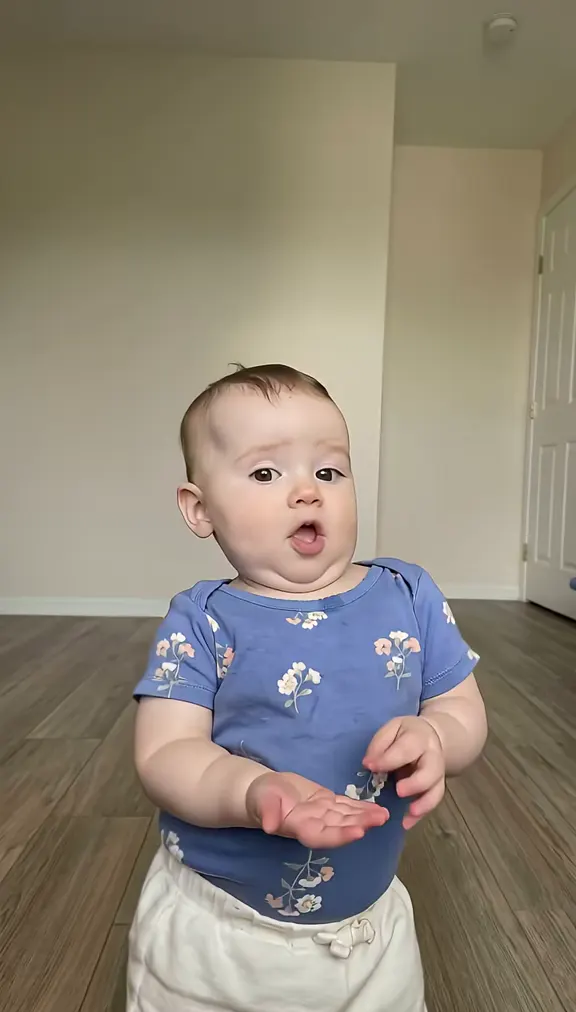
The biggest one: blue tee, bare feet
@frankietreasure5 on TikTokDancing in mom’s arms
@l.x5840 on TikTokBlue tee, carpet and side steps
@makaylaemelia on TikTokStill holding the milk bottle
@giaogiao202 on TikTokPink pajamas, pigtails
@rwqerq07 on TikTokBear ears and a black onesie
@nginhi468 on TikTokPink tracksuit, party set
@movi.beats on TikTokCream set, closet doors
@bbykitty38 on TikTokGrey leotard, big empty room
@gooooood072 on TikTokPolka-dot dress and a pink bow
@pbp086qicazvn7a on TikTokHair bonnet in the kitchen
@gabrielleensley43 on TikTokStrawberry onesie, white bow
@foufhkfyg1 on TikTokGreen stripes, no props
@vanderboom.fairba on TikTokWhite onesie, pink blanket
@plll183 on TikTokWhat Is the AI Baby Dance?
The AI baby dance is a TikTok trend where one photo of a baby becomes a short clip of that baby dancing a fixed routine: a bounce side to side, two claps, a shoulder roll, hands at the cheeks, a point at the camera, a half spin. The face, the clothes and the room stay the child’s own, which is why the clips look like ordinary phone footage.
An AI baby dance starts with one photo of a child, usually standing still in a living room or a hallway, which an AI video model animates. That is also why half the comments ask whether it is real, and why the trend works as a joke: it is a baby doing something no baby can do, on the beat, on time, and identically every time. The version everyone is copying now comes from a CapCut photo template captioned "Wait until your baby starts dancing…". It went round in August 2026, with a boy holding a milk bottle and a baby dancing in someone’s arms, and then went much wider in late October on the "Bonito, Bonito" sound, where one post alone reached 18.3 million plays and 800,000 likes. The routine is always the same handful of moves: a bounce side to side, two claps, a shoulder roll, hands up by the cheeks, a point at the camera, a half spin, a kiss.
There is an older, parallel wave too. AI-generated babies have been dancing on TikTok since late 2025 on gospel and R&B channels, always the same few children, always captioned with a verse or a line about not turning back. Same idea, different job: those are made to carry a message, the ones on this page are made to carry your baby.
An AI baby dance made here is the third thing: not a fixed template and not a rendered stranger. You take one of the real videos above, add a photo of your own baby, and the model puts that baby into that video, doing those steps, in that room, with the sound still on it.
How to Make an AI Baby Dance Video
- 1
Pick the video
Choose one of the baby dance videos on the right: a living room, a hallway, a party set, a baby in someone’s arms. The AI copies its steps, camera and timing exactly.
- 2
Add the photo
Upload one photo of the baby, front facing, standing if possible. In the posts where a parent is holding the baby, a second photo replaces the adult too.
- 3
Generate and post
Your AI baby dance keeps the sound of the post you picked, so when you put it on TikTok it lands on the same audio as the rest of the trend.
Tips for a Better AI Baby Dance Video
A photo where the baby stands
The dance is all legs and hips. A standing photo, even a slightly wobbly one, gives a much better AI baby dance than a close-up of the face: the model has to invent less, and the face stays yours.
Match the room and the light
Pick the video whose background looks like the place in your photo. A photo taken in a bright living room suits the carpet clips; one taken in a hallway suits the closet-door clips. It is the difference between an AI baby dance you notice and one you do not.
One photo, one baby
Every video on this page has one baby in it, so one photo is enough. Add a second photo only when a parent is in frame and you want them replaced too.
Let it keep the sound
The sound is half the trend: "Bonito, Bonito", "Dame Hombro", "Supalonely". The AI baby dance comes back with the audio of the post you picked, so it posts onto the same sound page.
Try it with the dog
Same routine, on four legs: upload a photo of your pet, pick a plain clip, and it stands up and does the claps and the point. It is the version that gets sent round the family group chat.
Pricing
Each AI baby dance video is one use (700 credits), whether you pick 12 or 15 seconds. The price is on the button before you start, and nothing else is added.
A single use is $9.90; packs of 4 and 8 uses, or a monthly plan that posts trend videos to your accounts for you, cost less per video. A render that fails is refunded automatically.
Autopilot plans
Every month we turn the newest trends into meme videos and post them to your accounts. Each post is one of the plan’s videos, and any you make yourself come out of the same count. Cancel any time.
One-time video packs
Pay once and use them on any trend template, at any length. The credits never expire, and the other video tools can spend them too.
Use it responsibly
- Only upload photos of yourself, of people who said yes, or of your own pets.
- Do not use it to make someone look like they did something they did not.
- Label the result as AI when you post it; TikTok and Instagram both have an AI-generated tag.
- Only upload photos of your own child, or of a child whose parent has said yes. Do not make these videos of other people’s babies.
- Treat the finished video as what it is, an AI edit: keep the AI label on when you post it, especially with a child in it.
Frequently Asked Questions
What is the AI baby dance?
A TikTok trend where one photo of a baby is turned into a short clip of that baby dancing a fixed routine: side-to-side bounces, two claps, a shoulder roll, hands at the cheeks, a point at the camera, a spin. The face and the clothes stay the child’s own, so it reads as real footage.
Is the AI baby dance real or AI-generated?
The babies are real children, the dancing is AI. Parents upload a photo of their own child and the model animates it, which is why the rooms and the outfits look ordinary and the faces are recognisable. That is also the point of the trend: it is your baby, doing a dance they cannot do yet.
What happened to the AI baby dance?
Nothing: it keeps getting deleted and re-uploaded. Templates are pulled, posts come down, and the sound changes with each wave, which is why the clip you saved in August is not the one going round now. The October wave on "Bonito, Bonito" is the biggest so far, and new versions were still going up the day this page was written.
What song is the AI baby dance to?
It changes with the post. The October wave mostly uses "Bonito, Bonito", earlier ones use "Dame Hombro" and "Supalonely", and gospel versions use worship songs. Every video on this page keeps the sound of the clip you pick, so you get that audio rather than a generic track.
How do I make one with my own baby?
Pick a video above, upload one photo of the baby, and generate. The model copies the steps, the camera and the timing of the reference and keeps the sound. You get an AI baby dance video as an MP4 with no watermark, ready for TikTok, Reels or Shorts.
Do I need a full-body photo?
It helps but it is not required. A standing, front-facing photo in good light gives the cleanest legs and hips; a seated or close-up photo still works, and the model fills in the rest. Avoid photos where the baby is held by someone who is not in the video.
Is this the CapCut template?
No. A CapCut template drops a face onto one fixed clip, so every video comes out with the same child, the same room and the same moves. Here the baby is rendered from your photo inside a real video from this page, so the body, the clothes and the room all belong to the clip you chose, and you can pick a different clip for every baby.
Can I put myself, or my pet, in it instead?
Yes. The reference is a dance routine, not a baby detector: adults, older kids, dogs and cats all work, and the funny version is usually the dog. The AI baby dance only needs one clear photo and a plain-background clip.
What are the gospel AI baby videos?
A parallel wave on TikTok since late 2025: AI-generated children dancing on a street at sunset or in a flower garden, captioned with a worship lyric. Same animation idea, different use, and those clips usually have the caption baked into the video, so they are not what this page swaps.
Is it safe to put my baby’s photo in?
Your photo stays in your account, goes to the video model only for your render, and is never shown to anyone else; you can delete it from your history whenever you want. The finished AI baby dance is yours, and posting it with the AI label is the honest way to share it.
What is the AI Baby Dance prompt?
The baby in a living room prompt is in the AI Prompts section below. It starts: "Image 1 is the Baby." Paste the rest into any AI video tool that accepts your photos.
One Photo Is All They Need
Pick the video, add the photo, and post your AI baby dance while the trend is still climbing.
Make my baby danceMore Trends to Remix
Tung Tung Tung Sahur Dance
Angry Dance Filter
Gangnam Style AI Dance
Smalltown Boy Dance AI
Two Girls Kicking Meme
I’m So In Love With You Dance
iPhone Kupi Dance
Ba Ba Ba Dance
AI Prompts for the AI Baby Dance
The prompt that swaps the baby in a real video, and four text prompts for the open generator. They spell out the routine move by move, so they also work in any image-to-video model that takes your photos as Image 1 and Image 2.
Baby in a living room
Image 1 is the Baby. A vertical phone video, full body in frame, camera fixed low at the baby’s height, soft daylight from a window, crisp and real, the way a parent films in the living room. No text, no captions, no logos. The baby from the image stands barefoot on a rug in a bright living room and does the AI baby dance from TikTok: they stand in the middle of the floor and bounce side to side with the knees, clap twice in front of the chest, roll the shoulders, wave both hands up by the cheeks, point at the camera, spin half a turn on the spot, then blow a kiss and laugh, delighted with themselves at the end. Keep the baby’s face, hair, skin tone and outfit exactly as in Image 1. Audio: a bouncy viral pop sound with a heavy beat, no dialogue.
Other versions: Two babies side by side · Dressed up for a party · The dog does it instead