
GTA 5 Goodbye: Put Yourself in the Farewell Cutscene
Thirteen years of Los Santos end on a pier at sunset: Michael, Franklin and Trevor hug you, hand you the GTA V disc and walk off so GTA 6 can begin. That is the GTA 5 goodbye AI trend from the week GTA VI came out. Pick one of the 14 farewell scenes below, upload one photo, and you are the kid who grew up with them, the player in the diner, or Lucia taking the disc to Vice City, with the scene’s original sound. No CapCut, no watermark.
- 14 scenes to remix
- One photo
- The trio stays
- Original sound
- No watermark
You
The young man the trio say goodbye to
Sexually explicit (NSFW) content is strictly prohibited.
One person per photo, face clearly visible, front-on and well lit. Crop out anyone else.
Pick a sample
Rendering takes about 7 min. Finished clips land in History.
TL;DR
Rising · as ofGTA 5 goodbye is TikTok’s send-off for Grand Theft Auto V in the week GTA VI came out: nostalgia edits of Los Santos, and the version this page makes, AI live-action short films where Michael, Franklin and Trevor say goodbye at sunset to the kid who grew up with them, or hand the GTA V disc to GTA VI’s Lucia. A CapCut template now puts your own face in that scene, and it is still rising on launch day: 70,000 template uses and 1,500 #gta5goodbye videos on 18 November.
- Original post
- The earliest AI farewell film found, 12 November 2026: a boy meets Michael, Franklin and Trevor on the pier in 2013 and says goodbye to them as a grown man in 2026 (“13年間、ありがとう。”, 5.7M plays). · @uekan2b
- Sound
- original sound - lucidvicegta67 — open it in TikTok and tap “Use this sound”.
- Also called
- goodbye gta 5, gta 5 goodbye ai, gta 5 goodbye ai trend, goodbye gta 5 hello gta 6, gta 5 final goodbye, gta 5 farewell, gta 5 to gta 6 trend, gta5 the next chapter, gta 5 beach hug, adios gta 5, adiós gta 5, bienvenido gta 6, #gta5goodbye, #adiosgta5gta6
- Last updated
GTA 5 Goodbye Scenes to Remix
Fourteen stretches of the most-watched GTA 5 goodbye films, most-played first: the boy who grew up with the trio, the diner in the rain, the desert road where GTA VI’s Lucia and Jason meet them, the pier where Lucia gets the disc, and two results of the CapCut template. Each one has a single “You” slot for the person the farewell is about. Click one to hear it, pick one to remix.
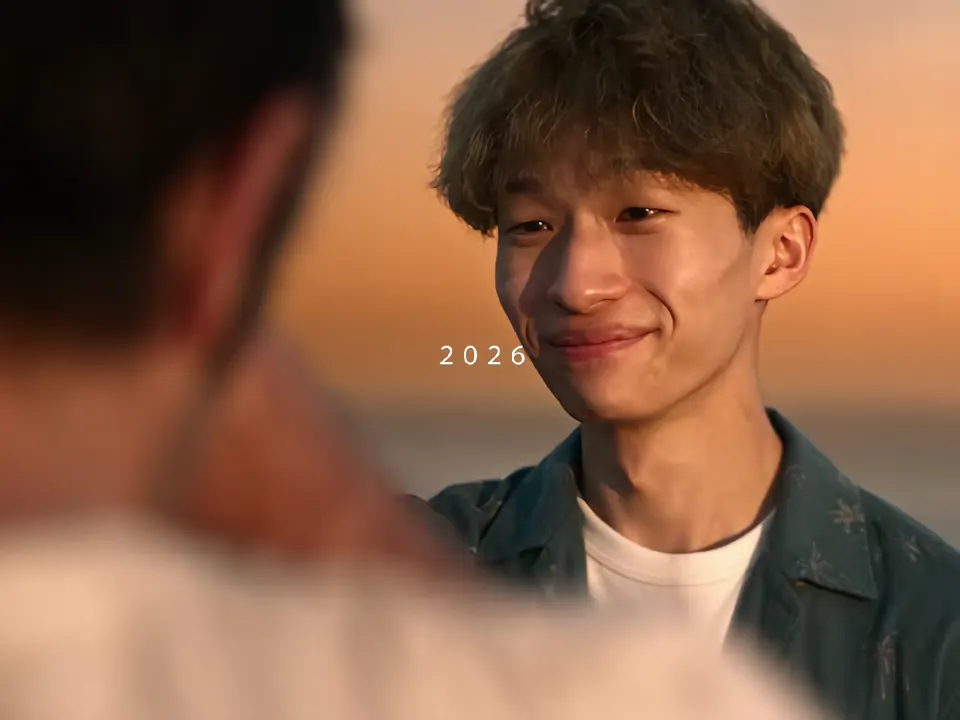
2026: the last fist bump on the pier
@uekan2b on TikTokThe trio leave the diner
@b3cause1 on TikTokLucia and Jason meet the trio
@gta6gamplay on TikTok2013: meeting the trio as a kid
@uekan2b on TikTok“Goodbye, GTA V - Welcome, GTA VI”
@lucidvicegta67 on TikTok13 years with the trio, year by year
@uekan2b on TikTokRooftop, skydive, one last selfie
@uekan2b on TikTokTrevor says goodbye
@lucidvicegta67 on TikTokDriving off to Vice City
@lucidvicegta67 on TikTokThe new crew sits down
@b3cause1 on TikTokFive of them walk into the sunset
@gta6gamplay on TikTok2013 and 2026, the blond kid
@lnvnjr on TikTokThe CapCut template: the new guy
@hickey4014 on TikTokThe CapCut template: the handshake
@bella.moore54 on TikTokWhat Is the GTA 5 Goodbye Trend?
The GTA 5 goodbye trend is how TikTok said farewell to Grand Theft Auto V as GTA VI came out. Most posts are nostalgia edits: Los Santos at sunset, old missions, the radio, Michael, Franklin and Trevor one last time, set to slow songs.
The posts that broke out are AI short films that look like live action. The three protagonists stand on the Del Perro pier at golden hour and say goodbye to someone: a boy who met them in 2013 and comes back grown up, a player in a cap who watches them leave a diner, or Lucia, who gets the GTA V disc and drives off toward Vice City. The idea under all of them is the same. These characters were part of growing up, and now they are handing the city on.
Then CapCut templates turned it into a photo trend: you upload a picture and become the newcomer the trio hug and hand the disc to. This page does the same without CapCut. You pick one of the films above as the reference, upload one photo, and the video model swaps you into that role, keeping the trio, every cut, the sunset and the sound.
Timeline
Goodbye edits begin: “Bye GTA 5, We will miss you” sends Sulley and Mike off as GTA VI and GTA V, 2M likes.
The first AI live-action farewell: @uekan2b’s boy who grew up with the trio (5.7M plays). The same day, @gta6gamplay’s desert road where the trio meet Lucia and Jason (6.9M plays).
@lucidvicegta67 posts “Goodbye, GTA V - Welcome, GTA VI” (4.3M plays), and an hour later the first CapCut template goes up on its sound.
@b3cause1’s rainy diner version, “Thanks You GTA V And Hello GTA VI”, reaches 12.7M plays and 2M likes.
A second CapCut template follows, and tutorials titled “How to do the viral GTA 5 Goodbye AI trend” take over the sound.
The two templates stand at 59,952 and 70,044 uses, #gta5goodbye at 1,506 videos; GTA VI launches the next day.
Is This From Rockstar?
No. None of these films are Rockstar’s. They are fan-made AI videos: the actors who look like Michael, Franklin, Trevor, Lucia and Jason are generated, and so is the pier. What makes them work is that they look like a cutscene the game never had, the goodbye fans wanted after thirteen years.
The scenes you make here are the same kind of fan video. Keep the AI label on when you post it.
GTA 5 Goodbye or GTA 6 Loading Screen?
Two different GTA trends ran in the same launch week. The GTA 5 goodbye is a live-action film: you, the trio, the pier and a farewell. The GTA 6 loading screen is a one-photo wipe that redraws you as the hand-drawn Vice City art GTA shows while the game loads. If you want the comic-book drawing of yourself rather than the goodbye scene, that one has its own page.
What Song Is the GTA 5 Goodbye Trend?
There is no single song. The CapCut templates and their tutorials use the sound of the “Goodbye, GTA V - Welcome, GTA VI” film, “original sound - lucidvicegta67”, a quiet piano and dialogue track. The nostalgia edits use whatever hurts most: “See You Again”, M83’s “Midnight City” slowed down, and “Goodbye, GTA V”, a song written for the occasion. Every clip here keeps its own film’s sound, and your remix keeps the sound of the clip you pick.
How to Make Your GTA 5 Goodbye Video
- 1
Pick your goodbye
The pier at sunset with the trio, the rainy diner, the 13 years montage, or Lucia driving off with the disc. Each clip says on its slot who you become.
- 2
Upload one photo
A clear photo of your face, front-on and well lit. For the 2013 kid scenes, use a childhood photo; for the desert road, add a second photo for your partner if you like.
- 3
Generate and post it
Your GTA 5 goodbye comes back as the same scene with you in it, the same cuts and the original sound. Post it with #gta5goodbye and say it is AI made.
Tips for a Better GTA 5 Goodbye
Match the age of the scene
The 2013 shots are a ten-year-old. A childhood photo of you gives the best “then”; a recent one gives the best “now”.
Face front, good light
The films are close-ups at golden hour. A sharp, front-on photo with both eyes visible keeps you recognisable through every cut.
One person per photo
Crop out friends and pets. Two faces in one photo get blended into one.
Bring your partner to the desert road
The two desert road clips have a second slot in Lucia’s spot, so a couple can walk into the sunset with the trio.
Shorter clips, cleaner swaps
The two 10-second template clips have the fewest cuts, so they are the safest first try.
Pricing
Each GTA 5 goodbye video is one use (700 credits), whether you pick 10, 14 or 15 seconds. The price is on the button before you start, and nothing else is added.
A single use is $9.90; packs of 4 and 8 uses, or a monthly plan that posts trend videos to your accounts for you, cost less per video. A render that fails is refunded automatically.
Autopilot plans
Every month we turn the newest trends into meme videos and post them to your accounts. Each post is one of the plan’s videos, and any you make yourself come out of the same count. Cancel any time.
One-time video packs
Pay once and use them on any trend template, at any length. The credits never expire, and the other video tools can spend them too.
Use it responsibly
- Only upload photos of yourself, of people who said yes, or of your own pets.
- Do not use it to make someone look like they did something they did not.
- Label the result as AI when you post it; TikTok and Instagram both have an AI-generated tag.
- Grand Theft Auto, GTA, Los Santos, Vice City and their characters belong to Rockstar Games. ViralRemix is not affiliated with Rockstar Games or Take-Two, and the GTA 5 goodbye videos made here are fan-made AI scenes, not official footage. Keep the AI label on, and do not sell them or pass them off as official.
Frequently Asked Questions
What is the GTA 5 goodbye AI trend?
A TikTok trend from the week GTA VI came out: AI short films where Michael, Franklin and Trevor say goodbye on the pier at sunset to the kid who grew up with them, or hand the GTA V disc to Lucia. A CapCut template then let people put their own face in, and this page does the same in the browser.
How do I put myself in the GTA 5 goodbye video?
Pick one of the 14 scenes on this page, upload one clear photo of your face, and generate. The video model puts you in the role the farewell is about, the kid, the player or Lucia, and keeps the trio, the cuts and the sound.
Who made the original GTA 5 goodbye video?
Several fans did, all in the same week. The earliest AI film found is @uekan2b’s boy who grows up with the trio, from 12 November 2026. The one the CapCut templates copy is @lucidvicegta67’s “Goodbye, GTA V - Welcome, GTA VI” from 14 November, and the most played is @b3cause1’s diner version, at 12.7M plays.
Do I need CapCut for the GTA 5 goodbye trend?
No. The trend spread through two CapCut templates, but here you pick a scene, upload a photo and get the video in the browser, without the CapCut watermark.
Can I do it with my partner?
Yes. The two desert road clips have a second slot in Lucia’s spot, so you and your partner meet the trio and walk off with them as the next generation.
Is the GTA 5 goodbye video official?
No. The films are fan-made AI videos, not Rockstar footage, and this site is not affiliated with Rockstar Games or Take-Two.
How long is the video?
As long as the scene you pick: 10 to 15 seconds. Each clip is one stretch of a longer film, cut where the scene ends.
What is the GTA 5 Goodbye AI prompt?
The goodbye on the pier prompt is in the AI Prompts section below. It starts: "Cinematic live-action short film, 15 seconds, shot like a movie at golden hour: an orange and pink sunset over the Pacific, palm trees, a wooden pier with a Ferris wheel, warm film grain, shallow depth of field, slow emotional piano music." Paste the rest into any AI video tool that accepts your photos.
One Last Ride
One photo and one scene, and the trio say goodbye to you on the pier before GTA 6 takes over.
Make my GTA 5 goodbyeMore Trends to Remix
WWE Tag Team Partner
Tough Like a Gorilla
BABYMONSTER DESERVE
Give It All BigXthaPlug
Gangsta's Paradise AI Trend
Jensen Huang Dance
Spin That Coupe Like What
Stormzy Shut Up AI
GTA 5 Goodbye AI Prompt
The pier goodbye written out as a text prompt, for the open generator or any image-to-video model that takes a photo. The other versions are the 2013-to-2026 then-and-now, the diner and the hand-over to GTA 6.
Goodbye on the pier
Cinematic live-action short film, 15 seconds, shot like a movie at golden hour: an orange and pink sunset over the Pacific, palm trees, a wooden pier with a Ferris wheel, warm film grain, shallow depth of field, slow emotional piano music. The person from Image 1 walks down the pier toward three men who look like the GTA V protagonists: a tired man in his late forties in a grey suit and open white shirt, a young man in a dark green work shirt, and a balding, wild-eyed man in a stained white T-shirt, who are waiting at the railing. The man in the green shirt fist-bumps them, the bald man grins and grabs their shoulder, and the man in the grey suit pulls them into a long hug and ruffles their hair. They hand the person a worn GTA V game case, look at the sunset one last time, and walk away down the pier while the person from Image 1 watches them go, eyes wet, smiling. Keep the face, hair, skin tone and build of the person in Image 1 recognisable in every shot.
Other versions: Then and now, 2013 to 2026 · The last night in the diner · Handing it on to GTA 6