
GTA 6 Loading Screen: Turn Your Photo Into the Vice City Art
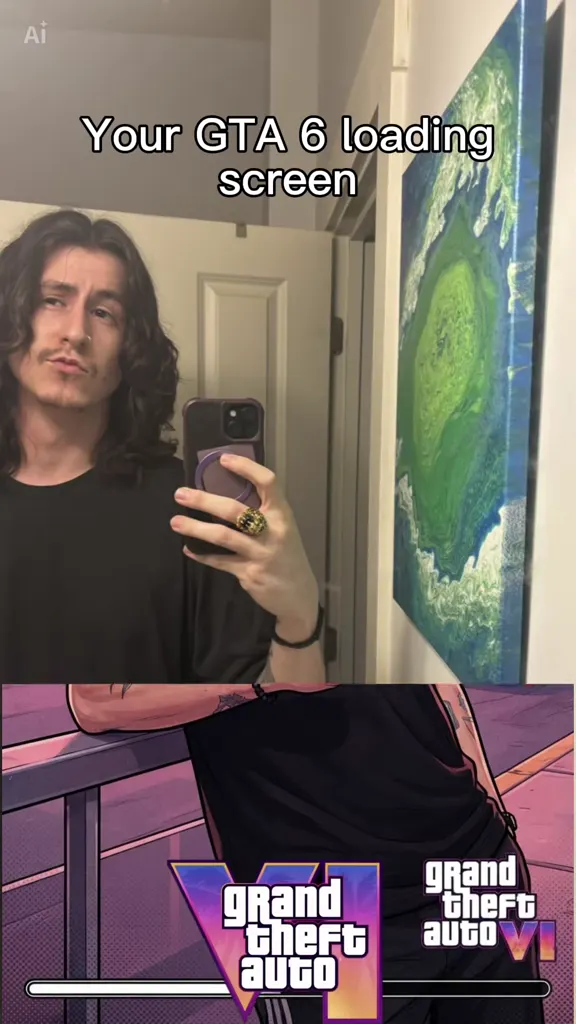
Your photo, then blocks slide up from the bottom, and you are a GTA 6 loading screen: redrawn in inked comic-book lines under a pink Vice City sunset, palm trees, neon hotels and a sports car behind you. That is the “Your GTA 6 loading screen” trend. Pick one of the 16 clips below, add one photo of you, your partner, your dog or your car, and get the same eight seconds with you in them and the original sound. No CapCut, no watermark.
- 16 clips to remix
- One photo
- The wipe, kept
- Original sound
- No watermark
Sexually explicit (NSFW) content is strictly prohibited.
One person per photo, face clearly visible, front-on and well lit. Crop out anyone else.
Pick a sample
Rendering takes about 7 min. Finished clips land in History.
TL;DR
Rising · as ofThe GTA 6 loading screen trend turns one photo of you into the kind of illustrated character art Grand Theft Auto shows while the game loads: the post opens on your real photo under “Your GTA 6 loading screen”, blocks slide up from the bottom, and you come out redrawn in inked comic-book lines under a pink Vice City sunset. It is a CapCut template from late August 2026 that had a first wave in September and a much bigger one in the week before GTA VI’s November launch, and it is still rising: about 1,900 new uses a day.
- Original post
- The earliest post found on the template’s sound, 11 September 2026: a mirror selfie in a motorcycle helmet, wiped into a Vice City loading screen (“im surprised it actually got the sena and the go pro”). · @justakilogram
- Sound
- original sound - the_s706 — open it in TikTok and tap “Use this sound”.
- Also called
- your gta 6 loading screen, gta 6 loading screen ai, gta 6 loading screen edit, gta 6 loading screen effect, gta 6 loading screen trend, gta 6 filter, gta 6 ai photo trend, gta 6 screen ai, gta loading screen ai, gta loading screen ai generator, gta 6 photo filter, turn my picture into gta character, #gta6loadingscreen
- Last updated
GTA 6 Loading Screen Examples to Remix
Sixteen posts from the trend’s own sound, most-played first. Each one opens on a real photo and wipes into the GTA 6 loading screen version of it: a mirror selfie, a red hoodie, a birthday cake, a suit in the park, a police officer, a couple, a bulldog, two kittens, a black cat and a steam train. Click one to hear it, pick one to remix.
“My loading screen”
@shadow_monarch_d on TikTokRed hoodie, phone in hand
@ncc0910 on TikTok“A little AI magic”
@realamosjoe on TikTokBathroom mirror to Ocean Drive
@ykstephhh on TikTokSuit and shades in the park
@heiselt89 on TikTok“Life as a GTA character”
@m0rgan20 on TikTokSelfie to sunglasses
@awada1990 on TikTokThe cop on the cover
@monk3yycop on TikTokWith the loading bar
@marcoroquemore on TikTokTwo kittens and a beard
@silentapprentice on TikTokThe cat gets a cameo
@jaydizzlemanizzle4 on TikTokRed curls by the truck
@sincitycurls on TikTokArms crossed, cap on
@thebronzeking on TikTok“10 days until GTA 6”
@retabaddies on TikTokA steam train on the loading screen
@toweringduck on TikTok“Still 100% Mr. Marley”
@chrisdrawdy2 on TikTokWhat Is the GTA 6 Loading Screen Trend?
The GTA 6 loading screen trend is an eight-second TikTok clip that turns one photo of you into GTA 6-style loading screen art. It opens on your real photo, blocks of a new picture slide up from the bottom, and you end up redrawn as a game character in a hand-drawn Vice City scene.
The scene is always the same mood: “Your GTA 6 loading screen” written at the top, bold inked outlines, a pink and orange sunset, palm trees, neon art-deco hotels and a sports car to lean on.
The joke is the one every Grand Theft Auto player knows. While the game loads, the series shows big illustrated portraits of its characters, and with GTA VI about to come out, everybody wanted to see what they would look like as one. The drawing keeps what makes the photo yours: your glasses, your beard, your hoodie, your braids, even the phone in your hand. People post it as their countdown post, their “which character are you” post, or with their dog, their cat or their truck instead of themselves.
It is a fan-made art style, not anything from Rockstar Games: the scenes come from a CapCut template called “GTA 6 Screen Ai”. This page does the same thing without CapCut. You pick one of the clips above as the reference and the video model redraws your photo inside it, so the opening photo, the block wipe, the Vice City scene and the sound all come from the clip, with you in it.
Timeline
The older version: a “GTA loading screen ai trend” post redraws a photo as a San Andreas-style loading screen and reaches 4.9M plays.
The “GTA 6 Screen Ai” CapCut template and its sound, original sound - the_s706, go up the same day.
The first posts on the sound: a helmet selfie, then a girl on her bed, both wiped into the pink Vice City art.
The first wave peaks: a selfie that ends in sunglasses gets 4,550 likes and “Life as a GTA character” 3,372.
The launch countdown restarts it: “My loading screen” reaches 126K plays, and posts on the sound climb from six a day to seventeen by 13 November.
The template stands at 151,781 uses, adding about 1,900 a day, and the sound at 9,815 videos.
Is This the Real GTA 6 Loading Screen?
No. The real GTA 6 loading screens are Rockstar’s own artwork of the game’s characters, Jason and Lucia among them. The trend borrows the look of that art, not the art itself: the illustrations are made by AI from your photo, and the Vice City setting is drawn in the same spirit. Post yours as a fan edit, with the AI label on.
That is also why the result looks like you and not like a game character. The model keeps your face, hair and clothes and only changes the drawing style and the scene around you.
The Older GTA Loading Screen AI Trend
Before GTA 6, there was the GTA loading screen AI trend in the style of San Andreas and GTA V: a warm orange Los Santos sunset, the old “Grand Theft Auto” lettering and a flatter, painted look. One post of it in January 2026 reached 4.9M plays. The GTA 6 version swaps that for the pink and purple Vice City palette, the neon hotels and the slide-up wipe, and that is the version this page makes.
What Song Is the GTA 6 Loading Screen Trend?
The template’s own sound is “original sound - the_s706”, a short moody beat; most GTA 6 loading screen posts keep it, and every clip here has it. The tutorials that teach the template usually play “Last Thing You Need (from GTAVI: The Album)” by Morgan Wallen over their screen recordings instead, which is why the two are often named together. Whichever clip you remix, your video keeps that clip’s sound.
How to Make Your GTA 6 Loading Screen
- 1
Pick the loading screen you want
Each clip above ends in a different Vice City scene: leaning on a red sports car, standing on Ocean Drive, sitting on a railing, two people side by side. Pick the one whose pose and scene you want to end up in.
- 2
Upload one photo
One clear photo of whoever goes on the loading screen: face to the camera, waist up or full body, glasses and outfit on. For the couple or dog clip, add one photo for each.
- 3
Generate and post it
Your GTA 6 loading screen comes back as the same eight seconds: your photo, the wipe, the drawing of you, and the original sound. Post it with #gta6loadingscreen and say it is AI made.
Tips for a Better GTA 6 Loading Screen
Waist up or full body
Loading screen art is a character standing in a scene. A photo that shows your shoulders, arms and outfit gives the drawing a pose to keep; a tight face selfie comes back as a head on a borrowed body.
Wear the thing people know you by
Glasses, a cap, a chain, a uniform, a favourite hoodie: the drawing keeps them, and they are what makes it read as you at a glance.
Take off the sunglasses
Several of the best posts end in sunglasses, but the model added them. If your photo hides your eyes, the face in the drawing is guessed.
Pets and cars work
A dog, a cat, a truck or a train in the same spot gets the same treatment. Use a photo of the whole animal or vehicle in good light.
Pick a clip with your number of people
Solo clips swap one person; the couple and owner-and-dog clips give each of you a photo slot, so nobody gets merged.
Pricing
Each GTA 6 loading screen video is one use (700 credits), whether you pick 8 seconds. The price is on the button before you start, and nothing else is added.
A single use is $9.90; packs of 4 and 8 uses, or a monthly plan that posts trend videos to your accounts for you, cost less per video. A render that fails is refunded automatically.
Autopilot plans
Every month we turn the newest trends into meme videos and post them to your accounts. Each post is one of the plan’s videos, and any you make yourself come out of the same count. Cancel any time.
One-time video packs
Pay once and use them on any trend template, at any length. The credits never expire, and the other video tools can spend them too.
Use it responsibly
- Only upload photos of yourself, of people who said yes, or of your own pets.
- Do not use it to make someone look like they did something they did not.
- Label the result as AI when you post it; TikTok and Instagram both have an AI-generated tag.
- Grand Theft Auto, GTA and Vice City belong to Rockstar Games. ViralRemix is not affiliated with Rockstar Games or Take-Two, and the loading screens made here are fan-made, AI-generated art in a GTA 6 style, not official artwork. Keep the AI label on, and do not sell them or pass them off as official.
Frequently Asked Questions
What is the GTA 6 loading screen trend?
A TikTok trend where one photo becomes an eight-second clip: it opens on your real photo under “Your GTA 6 loading screen”, blocks slide up from the bottom, and you come out redrawn as GTA 6-style loading screen art in front of a Vice City sunset. It started as a CapCut template in August 2026 and took off again in the run-up to the GTA VI launch.
How do I turn my picture into a GTA character?
Pick one of the 16 clips on this page, upload one clear photo of yourself, waist up or full body, and generate. The video model redraws you inside the clip as a GTA 6-style character, keeping your face, hair and outfit, with the wipe and the sound of the clip.
Is this the official GTA 6 loading screen?
No. It is fan-made AI art in a GTA 6 style. The real loading screens are Rockstar Games’ own artwork, and this site is not affiliated with Rockstar or Take-Two.
How do I do the GTA AI filter online?
Right here: this page works as a GTA loading screen AI generator in the browser. Upload one photo, pick a clip, and the GTA 6 photo filter look is applied as a video, wipe and sound included. The prompt above also works in other image-to-video tools.
Do I need CapCut for the GTA 6 loading screen effect?
No. The trend comes from the CapCut template “GTA 6 Screen Ai”, but here you pick a clip, upload a photo and get the GTA 6 loading screen video in the browser, without the CapCut watermark.
What song is used in the GTA 6 loading screen trend?
The template’s own sound, “original sound - the_s706”. Tutorials often use Morgan Wallen’s “Last Thing You Need (from GTAVI: The Album)” instead. Your video keeps the sound of the clip you remix.
Can I make a GTA 6 loading screen with my dog, cat or car?
Yes. The black cat, owner-and-dog and steam train clips have their own photo slots for an animal or a vehicle, and the pet and car prompts above do the same as text.
Can two people be on the same loading screen?
Yes. Pick the couple clip, “10 days until GTA 6”, and upload one photo for each of you in the two labelled slots. Each person keeps their own face, hair and outfit in the drawing, and you stand together in front of the car like the two leads of a crime game.
How long is the video?
Eight seconds, the same as the trend on TikTok: about two seconds of your real photo, three seconds of the block wipe, and the GTA 6 loading screen art of you held to the end, with the clip’s original sound running under all of it.
What is the GTA 6 Loading Screen AI prompt?
The solo loading screen prompt is in the AI Prompts section below. It starts: "Vertical 8-second clip." Paste the rest into any AI video tool that accepts your photos.
Load In
One photo and one clip, and your GTA 6 loading screen is ready: you, redrawn under the Vice City sunset, with the trend’s sound.
Make my GTA 6 loading screenMore Trends to Remix
Sunlight Eye Portrait
ChatGPT Sweater Trend
Money Flex AI
Sheru Bhai AI
Self Hug Sketch
Need for Speed AI Trend
King Jin AI Trend
All I Want for Christmas Glow Up
GTA 6 Loading Screen AI Prompt
The look written out as a text prompt, for the open generator or any image-to-video model that takes a photo: the opening photo, the slide-up wipe and the Vice City loading screen illustration. The other versions are the same prompt for a couple, a pet or your car.
Solo loading screen
Vertical 8-second clip. It opens on the photo from Image 1 with the white caption “Your GTA 6 loading screen” at the top; after two seconds, square blocks of a new picture slide up from the bottom and replace the photo, and the clip holds on a hand-drawn video game loading screen illustration: bold black outlines, flat cel shading, saturated colours, a pink and orange Vice City sunset with palm trees, neon art-deco hotels on Ocean Drive and a classic sports car. No real logos, no watermark. In the illustration, the person from Image 1 leans on the sports car on Ocean Drive, posed like the cover of a crime game. Keep the face, hair, skin tone, build and outfit of Image 1 recognisable in the illustration. Audio: a slow, moody hip-hop beat.
Other versions: The two of you, Jason and Lucia style · Your dog or cat on the loading screen · Your car or truck as the cover