
AI Tiger Trend: Wrestle a Tiger on CCTV With One Photo
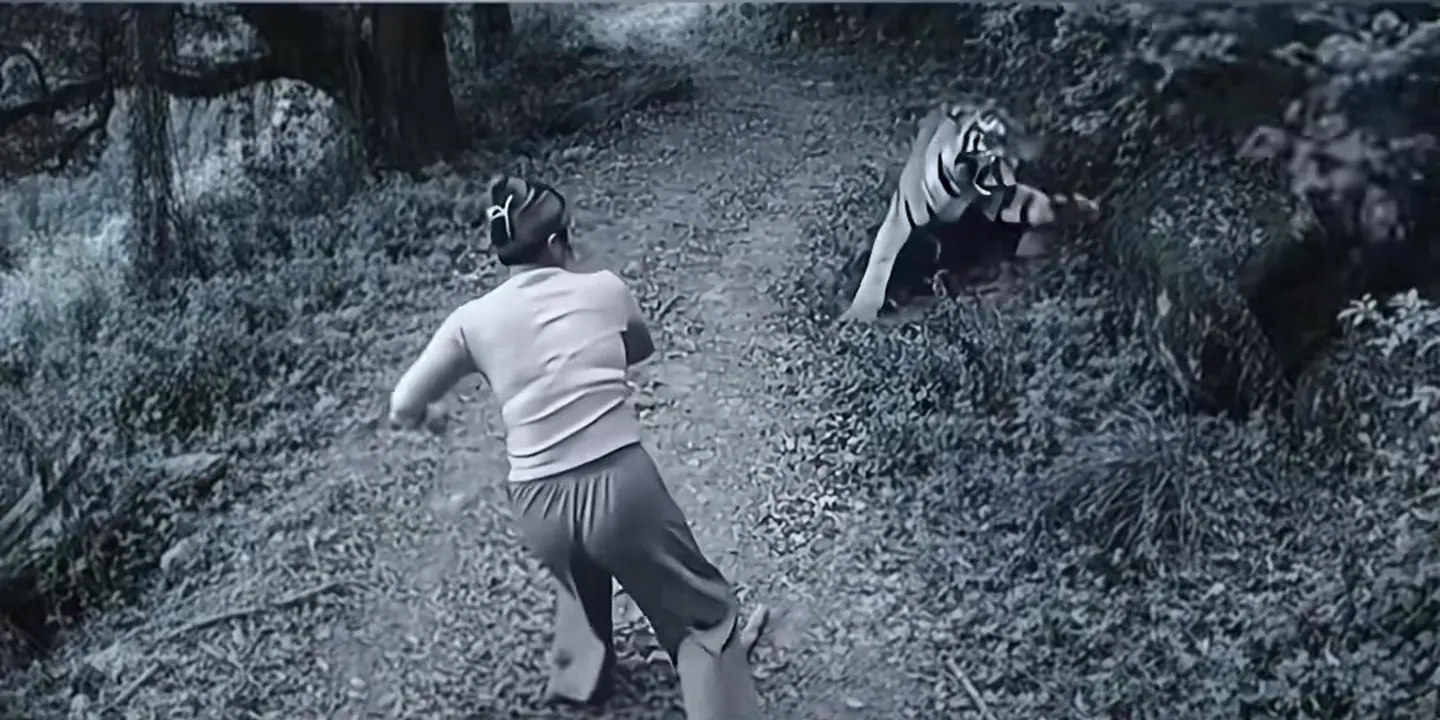
A grainy security camera, a forest trail, a tiger in the bushes, and somebody who picks up a stick and takes it on. In the AI tiger trend that somebody is you. Pick an AI tiger trend clip below, add one photo, and the AI puts you on the trail with the same charge, the same takedown and the original phonk sound.
- 19 clips to remix
- One photo
- Black-and-white CCTV look
- Original sound
Sexually explicit (NSFW) content is strictly prohibited.
One person per photo, face clearly visible, front-on and well lit. Crop out anyone else.
Pick a sample
Rendering takes about 7 min. Finished clips land in History.
TL;DR
At its peak · as ofThe AI tiger trend is fake security camera footage of you fighting a tiger: a black-and-white CCTV shot of a forest trail labelled “Jingyang Ridge”, where you pick up a stick, the tiger charges and you wrestle it to the ground. It took off on TikTok on 9 November 2026 through CapCut and Hypic templates, its CapCut template passed 74,000 uses in ten days, and million-play posts still land every few days.
- Original post
- @fahsai5350’s tutorial, 9 November 2026: the earliest big AI tiger fight post we found, 680K plays · @fahsai5350
- Sound
- original sound - darksan_phonk — open it in TikTok and tap “Use this sound”.
- Also called
- tiger fight ai, ai tiger fight trend, tiger ai trend, tiger roar ai trend, tiger transition ai, surveillance tiger fight, woman fights tiger ai, #surveillancetigerfight
- Last updated
AI Tiger Trend Videos to Remix
Single results from the most-watched AI tiger trend posts: men and women in hoodies, jackets, a pink dress and a backpack, all on the same CCTV trail, plus the colour versions with a shaved-head Wu Song and an orange tiger. Pick one and you take the fighter’s place.
The stick, the charge, the takedown
@fahsai5350 on TikTokBackpack on, tiger down
@xiaofei949 on TikTokA black jacket on CAM 05
@xiaofei949 on TikTokShe picks up the stick first
@lux40347 on TikTokCap, jeans and a tiger
@lux40347 on TikTokA navy hoodie meets the tiger
@sxfr8qu0l7 on TikTokMaroon hoodie, straight at it
@sxfr8qu0l7 on TikTokThe bright blue jacket
@sxfr8qu0l7 on TikTokPink hoodie on a REC camera
@sxfr8qu0l7 on TikTokLight jeans, flying tackle
@sxfr8qu0l7 on TikTokThe first big AI tiger trend post
@fahsai5350 on TikTokGrey sweater, wide stance
@xdwshfzqi0k on TikTokBlack polo, pinned it
@xdwshfzqi0k on TikTokJacket over the shoulder
@xdwshfzqi0k on TikTokCrop top versus tiger
@xdwshfzqi0k on TikTokA pink hanfu on Jingyang Ridge
@tuan31211 on TikTokShaved head, bare fists, Wu Song style
@tuan31211 on TikTokRed shirt and an orange tiger
@tuan31211 on TikTokWhite tee, colour version
@tuan31211 on TikTokWhat Is the AI Tiger Trend?
The AI tiger trend is a fake security camera clip. Grainy black-and-white footage from a high corner shows a dirt trail through the woods, with two gourds lying on the path. Someone walks in, notices a tiger crouched in the bushes, bends down to grab a stick, and the tiger charges. A second later they are rolling in the dirt, and the person comes out on top.
Nobody films an AI tiger trend clip: one photo goes into a CapCut or Hypic template and the AI tiger fight comes out. That is why most posts stack two or three results on top of each other, a friend, a sister, a dad, each one wrestling the same tiger on the same trail, set to the same phonk track.
On this page you get one clean AI tiger trend result with you in it, at the clip’s full length and with its original sound.
Timeline
@darksan_phonk posts the phonk track “DJA乐 - 毁灭 Destroy”. Its sound later carries almost every AI tiger trend post.
A CapCut template simply called “AI trend” goes up: upload one photo, get the CCTV tiger fight. It has 36,000 uses three days later.
@fahsai5350 posts a Burmese tutorial for the “ကျားရိုက် AI Trend” (“tiger-beating AI trend”), two results stacked on top of each other: 680K plays.
@fahsai5350’s second tutorial becomes the biggest post of the trend (2.0M plays, 62K likes), the #surveillancetigerfight tag is created, and Arabic tutorials follow (@sxfr8qu0l7, 1.2M).
Hypic versions of the AI tiger trend spread (@lux40347, 1.2M plays), French posts call it “the woman who fights the tiger”, and colour versions with an orange tiger appear.
The sound passes 5,100 videos and the CapCut template 74,000 uses; new posts keep coming at about 60 a day.
Why Does the Camera Say Jingyang Ridge?
The label in the corner reads “CAM 05 景阳冈 · 南侧监控”: camera 5, Jingyang Ridge, south side. Jingyang Ridge is where Wu Song kills a man-eating tiger in Water Margin, one of the most famous scenes in Chinese literature. In the story he drinks bowl after bowl of wine, ignores the warnings, crosses the ridge with his staff, and finishes the tiger with his bare fists after the staff breaks.
The AI tiger trend restages that scene as if a security camera had caught it: the wine gourds are on the trail, the stick is waiting to be picked up, and the shaved-head, bare-chested versions are dressed as Wu Song himself. You do not need to know the story for an AI tiger trend clip to land, but it explains the gourds.
Tiger Transition, Tiger Roar AI or Tiger Fight?
Searching TikTok for “tiger transition” mostly brings up a different trend: the summer 2026 makeup transitions to the “you cannot reason with a tiger” sound, where people swipe from a bare face to full tiger makeup. That one is done with makeup brushes, not AI.
The AI tiger trend is the CCTV fight on this page. Tutorials also call it the tiger fight AI trend, the tiger roar AI trend or the tiger-beating trend, and they all mean the same black-and-white clip. Another Burmese “tiger” trend from the same weeks has no tiger at all: that is the King Jin boss entrance.
How to Make the AI Tiger Trend Video
- 1
Pick a tiger fight clip
Each one is a single result from a real AI tiger trend post: different fighters, the same CCTV trail, a few in colour with an orange tiger.
- 2
Add one photo
A clear photo of you with your face in view. Full body works best, and the outfit in the photo is the one you fight the tiger in.
- 3
Create and post it
You get your AI tiger trend clip at the sample’s length with the original sound. Stack it with a friend’s version like the TikTok posts do, and tag it #surveillancetigerfight.
Tips for an AI Tiger Trend Video
A full-body photo
The camera is high and far away, so the AI tiger trend shows your whole body. A photo from head to feet, or at least the waist up, keeps your build and clothes right; a close selfie leaves the AI guessing below the shoulders.
Dress for the fight
Whatever you wear in the photo is what you wear in your AI tiger trend clip. A bright hoodie, a dress or a jacket reads well against the grey footage, which is why the top posts have them.
Stack two or three
The AI tiger trend posts that get the most views put two or three fighters on top of each other. Make one for you and one for a friend, then stack them in any editor.
Keep the phonk
The darksan_phonk track is how people spot the AI tiger trend in the feed. Every remix keeps the original sound of the clip you picked.
Pricing
Each AI tiger trend video is one use (700 credits), whether you pick any length from 5 to 11 seconds. The price is on the button before you start, and nothing else is added.
A single use is $9.90; packs of 4 and 8 uses, or a monthly plan that posts trend videos to your accounts for you, cost less per video. A render that fails is refunded automatically.
Autopilot plans
Every month we turn the newest trends into meme videos and post them to your accounts. Each post is one of the plan’s videos, and any you make yourself come out of the same count. Cancel any time.
One-time video packs
Pay once and use them on any trend template, at any length. The credits never expire, and the other video tools can spend them too.
Use it responsibly
- Only upload photos of yourself, of people who said yes, or of your own pets.
- Do not use it to make someone look like they did something they did not.
- Label the result as AI when you post it; TikTok and Instagram both have an AI-generated tag.
Frequently Asked Questions
What is the AI tiger trend?
A TikTok trend from November 2026 where one photo becomes fake CCTV footage of you fighting a tiger: you walk down a forest trail, grab a stick when the tiger charges and wrestle it to the ground, in grainy black and white.
Is the tiger fight video real?
No. Every AI tiger trend clip comes from a CapCut or Hypic template that turns one photo into the same security camera scene, which is why so many different people fight the exact same tiger on the exact same trail.
What does the Chinese text on the camera say?
“CAM 05 景阳冈 · 南侧监控” means camera 5, Jingyang Ridge, south side. Jingyang Ridge is where Wu Song beats a tiger to death in the classic novel Water Margin, and the gourds and stick on the trail come from that story.
What song is used in the AI tiger trend?
A phonk track posted by @darksan_phonk in July 2026, “DJA乐 - 毁灭 Destroy”, listed on TikTok as “original sound - darksan_phonk”. More than 5,000 videos use it, and every remix on this page keeps it.
Is this the tiger transition trend?
Not quite. On TikTok “tiger transition” usually means the makeup transition to “you cannot reason with a tiger”. Tutorials also use “tiger transition AI” for this CCTV fight, which is the AI tiger trend.
How do I do the AI tiger trend?
Pick one of the AI tiger trend clips on this page, add one clear photo of yourself, ideally full body, and the AI puts you on the trail in place of the fighter, with the same charge, the same takedown and the original sound.
What is the AI Tiger Trend prompt?
The cctv tiger fight prompt is in the AI Prompts section below. It starts: "Using my photo as the exact reference, make a video of me fighting a tiger, caught on a security camera." Paste the rest into any AI video tool that accepts your photos.
You Versus the Tiger, on Camera
One photo, and the AI tiger trend clip is you on the trail, grabbing the stick and taking the tiger down.
Make my AI tiger trend videoMore Trends to Remix
Pterodactyl in Mexico
Skibidi Babidi Boo Freestyle
Bad Aim Edit
Reaching Out Cat Trend
Tweenslop
Single Camel AI
Police Chase AI
Grandpa Said He'd Handle Dinner
AI Tiger Trend Prompts
The AI tiger trend prompts behind the versions on this page: the CCTV tiger fight, Wu Song on Jingyang Ridge, a roar-off with the tiger and a night-vision trail camera. Paste one into any image-to-video model with your photo.
CCTV tiger fight
Using my photo as the exact reference, make a video of me fighting a tiger, caught on a security camera. I walk down a dirt trail through the woods, spot a tiger crouched in the bushes ahead, bend down and pick up a stick, and the tiger charges; I meet it head on, we roll in the dirt, and I end up on top, pinning it to the ground. Keep my face, face shape, skin tone, hair, body type, age and outfit exactly as in my photo. Shot as grainy black-and-white security camera footage from a high corner angle, a little washed out, with a white camera label in the top-left corner, no other text and no logos. Horizontal 4:3.
Other versions: Wu Song on Jingyang Ridge · Roar-off with the tiger · Night-vision trail camera