
Sunlight Eye Portrait: One Beam of Sun Across Your Eyes
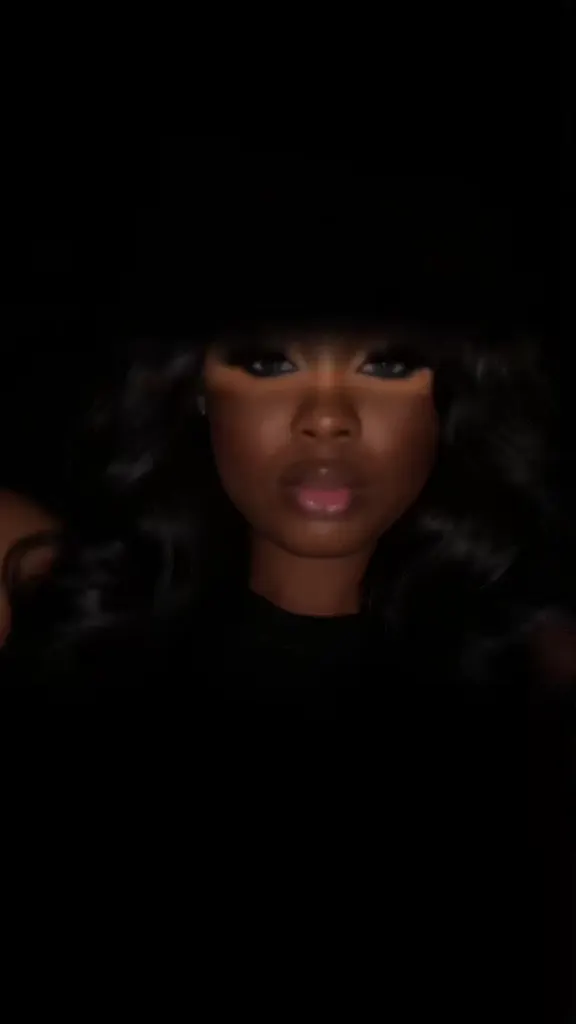
A dark, cinematic close-up of you with a single horizontal strip of golden sunlight across your eyes and everything else in shadow. That is the sunlight eye portrait, the ChatGPT prompt trend posted all over TikTok to H.E.R.’s “Did You Miss Me”. Here you skip the prompt: pick one of the real posts below, add one selfie, and the AI puts you in the light, blink and sound included.
- 7 posts to remix
- One selfie
- Your own eye color
- Moves, not a still
- Original sound
Sexually explicit (NSFW) content is strictly prohibited.
One person per photo, face clearly visible, front-on and well lit. Crop out anyone else.
Pick a sample
Rendering takes about 7 min. Finished clips land in History.
TL;DR
Rising · as ofThe sunlight eye portrait is an AI photo trend: one selfie becomes a dark, cinematic close-up with a single horizontal beam of warm sunlight across only your eyes. The prompt was first posted on X in June 2026; in November 2026 TikTok picked it up with H.E.R.’s “Did You Miss Me” as the sound, and new posts and tutorials are still landing every hour.
- Original post
- @Taaruk_’s prompt on X, 28 June 2026: two ChatGPT portraits with a horizontal beam of sunlight across only the eyes · x.com
- Sound
- DID YOU MISS ME (H.E.R.) — open it in TikTok and tap “Use this sound”.
- Also called
- horizontal sunlight eye portrait, sunlight eye trend, sunlight eye portrait trend, eye in sunlight trend, sunlight eye filter, did you miss me trend, dramatic sunlight eye ai portrait, cinematic eye light photo effect, eye lighting trend, light on eyes trend, #horizontalsunlighteyetrend
- Last updated
Sunlight Eye Portrait Videos to Remix
The most liked sunlight eye portrait posts first, then the moving ones: a woman going through look after look in the beam, a blue-lit edit, a red-haired “Did you miss me♡”, a slow blink, and the result reels that open the tutorial posts. The four image posts (chin on the hand, blue eyes, bangs, glasses) are still pictures set to their sound, here to show the look; they are not remixable. Remix a montage and you are in every shot.
Chin on the hand, the post that started it on TikTok
@onewish336 on TikTokFive faces in the beam
@cyairuizr8h on TikTokBlue eyes, hand in the hair
@angelic9130 on TikTokOne woman, look after look
@311hart on TikTokGlasses and gold hoops
@fantasybraidsbylakisha on TikTokCurls, straight hair, one beam
@user9888733511635 on TikTokBangs and a soft smile
@styleswithzilly on TikTokRed hair, “Did you miss me♡”
@midlifeglo43 on TikTokBlue light, glitch edit
@sharondacoleman22 on TikTokSix faces, glasses and braids
@bucv4khmz2 on TikTokRed lips, a slow blink
@avery_rhian on TikTokWhat Is the Sunlight Eye Portrait Trend?
The sunlight eye portrait is an AI portrait: you give ChatGPT (or Gemini) a selfie and a long prompt and get back an ultra-realistic close-up of yourself in near darkness, lit by one straight, horizontal strip of golden sunlight that falls across your eyes and nowhere else. Your forehead and your mouth sink into shadow, so the eyes, the lashes and the catchlights are all anyone sees.
People call it the horizontal sunlight eye portrait, the sunlight eye trend or the eye lighting trend, and post it with H.E.R.’s “Did You Miss Me”, which is why some search for the “did you miss me trend”. Most posts are one still picture; the ones that stop the scroll move: a blink in the light, a slow zoom, cuts between looks.
This page makes the moving version in one step: you pick a sunlight eye portrait video and the AI swaps you in, light, blink and sound included.
Timeline
@Taaruk_ posts the prompt on X with two ChatGPT portraits: a “dramatic horizontal beam of sunlight cutting across only the eyes”. The next day @nayefalsowaidy shares it as the “Eye Lighting Trend” (15K views).
H.E.R. posts a snippet of an unreleased song, “Did You Miss Me” (1.7M plays). The sound takes off on its own, with vlogs, glow-ups and “did you miss me?” captions.
@onewish336 posts a sunlight eye portrait with the prompt as the caption and “Did You Miss Me” as the sound: 69.6K plays and 5.8K likes, still the most liked post of the trend. @311hart posts one of the first moving versions the same day.
CapCut templates that turn a selfie into the portrait appear, and tutorial accounts start posting “horizontal sunlight eye portrait” how-tos, nearly all set to “Did You Miss Me”.
The sound passes 23,700 videos, about 2,100 new a day, and French-language tutorial copies of the sunlight eye portrait appear.
How to Do the Horizontal Sunlight Eye Portrait Trend
The usual way takes two apps. Paste the horizontal sunlight eye portrait prompt into ChatGPT with your selfie, save the picture, then animate it in Kling or a CapCut template and add “Did You Miss Me” in TikTok. Tutorial accounts show that whole route in 20 seconds of screen recording.
Here it is one step and no prompt: pick a post below, add your selfie, and you get the moving sunlight eye portrait at the post’s own length with its sound. Remix a montage and every face in it becomes yours.
Keep Your Own Eye Color
The prompt that goes round asks for “bright lights in bright blue/green eyes”, so ChatGPT hands many people blue or green eyes they never had. Brown eyes look amber in real sun anyway, which is the whole appeal.
Our remix takes your face, and your eye color, from your selfie, and our prompts below say to keep it. Shoot the selfie facing a window so your real iris color shows; if you want the light-eyed look on purpose, say so in the note.
Is It the Same as the Eyes in the Sun Trend?
No. The eyes in the sun trend, running on TikTok since 2023, is a real macro video of your eye in daylight, showing how brown eyes turn golden or how hazel eyes change color. The sunlight eye portrait is an AI picture of your whole face in the dark with one beam across the eyes.
They feed each other: both are about eyes catching the sun, and the AI version borrows its glow from the real one.
How to Make a Sunlight Eye Portrait With AI
- 1
Pick a post
Each clip is a real sunlight eye portrait post that moves: a blink, a zoom, a look change, or a fast montage of faces in the light. Pick the one with the move you want.
- 2
Add your selfie
One sharp photo of your face, front-on, eyes open and looking at the lens. Glasses, hair and earrings come with you.
- 3
Create and post it
You get the clip at its own length with its original sound. Post your sunlight eye portrait with #sunlighteyeportrait, #horizontalsunlighteyetrend and #didyoumissme.
Tips for the Sunlight Eye Portrait
Your eyes carry it
Use a photo with your eyes wide open, sharp and looking straight at the camera. No sunglasses, no hair over the eyes, no beauty filter.
Keep your head level
The beam runs straight across the face. A tilted head in your selfie gives a slanted strip of light, or a beam that misses one eye.
Glasses are fine
Normal glasses stay on and the light comes through the lenses, as in the glasses post below. Remove tinted lenses: they hide the catchlights.
Label it as AI
Every sunlight eye portrait is AI and the comments will ask for the prompt. Use TikTok’s AI-generated label and keep “Did You Miss Me” on it.
Pricing
Each sunlight eye portrait video is one use (700 credits), whether you pick any length from 5 to 15 seconds. The price is on the button before you start, and nothing else is added.
A single use is $9.90; packs of 4 and 8 uses, or a monthly plan that posts trend videos to your accounts for you, cost less per video. A render that fails is refunded automatically.
Autopilot plans
Every month we turn the newest trends into meme videos and post them to your accounts. Each post is one of the plan’s videos, and any you make yourself come out of the same count. Cancel any time.
One-time video packs
Pay once and use them on any trend template, at any length. The credits never expire, and the other video tools can spend them too.
Use it responsibly
- Only upload photos of yourself, of people who said yes, or of your own pets.
- Do not use it to make someone look like they did something they did not.
- Label the result as AI when you post it; TikTok and Instagram both have an AI-generated tag.
Frequently Asked Questions
What is the sunlight eye portrait trend?
An AI photo trend from November 2026: a dark, cinematic close-up of you with one horizontal beam of warm sunlight across only your eyes. People make it with a ChatGPT prompt and post it to H.E.R.’s “Did You Miss Me”.
How do you do the horizontal sunlight eye portrait trend?
With ChatGPT you paste the prompt with your selfie, then animate the picture in another app. Here it is one step: pick a moving sunlight eye portrait post, add your selfie, and the AI puts you in it with the original sound.
What song is used in the sunlight eye portrait trend?
“Did You Miss Me” by H.E.R., an unreleased song she previewed on TikTok on 6 November 2026. That is why the trend is also searched as the “did you miss me trend”.
Where did the sunlight eye portrait start?
With a prompt posted on X by @Taaruk_ on 28 June 2026: ChatGPT portraits with a horizontal beam of sunlight across only the eyes. It reached TikTok in November 2026, when people paired it with “Did You Miss Me”.
Will it change my eye color?
Not here. The popular prompt asks for blue or green eyes, which is why many results look nothing like the person. The remix keeps your own eye color from your selfie; the sun only makes it glow.
Is the sunlight eye filter a real TikTok filter?
No. The sunlight eye filter people search for is the ChatGPT prompt plus a CapCut template, not an in-app TikTok effect. This page does the same look from one selfie, already moving.
Can I do a sunlight eye portrait of my dog or cat?
Yes. The prompts section has a pet version: the beam across your pet’s eyes, a slow blink and an ear twitch. Upload your pet’s photo instead of a selfie.
What is the Sunlight Eye Portrait AI prompt?
The classic beam across the eyes prompt is in the AI Prompts section below. It starts: "Using my uploaded photo as the exact face reference, create an ultra-realistic cinematic close-up portrait of me, centered, direct eye contact with the camera, a calm confident expression, wearing a black sleeveless top against a black seamless background." Paste the rest into any AI video tool that accepts your photos.
Your Sunlight Eye Portrait, Moving
One selfie, one beam of golden light across your eyes, the rest in shadow: the sunlight eye portrait with you in it.
Make my sunlight eye portraitMore Trends to Remix
ChatGPT Sweater Trend
GTA 6 Loading Screen
Money Flex AI
Sheru Bhai AI
Self Hug Sketch
Need for Speed AI Trend
King Jin AI Trend
All I Want for Christmas Glow Up
Sunlight Eye Portrait AI Prompts
The sunlight eye portrait prompts behind the looks on this page: the classic beam, the navy turtleneck studio, the glam hand-on-chin, sun through the blinds and a pet. Paste one into ChatGPT or Gemini with your photo for the still, or into any image-to-video model for the moving version.
Classic beam across the eyes
Using my uploaded photo as the exact face reference, create an ultra-realistic cinematic close-up portrait of me, centered, direct eye contact with the camera, a calm confident expression, wearing a black sleeveless top against a black seamless background. Moody low-key studio light, a dark seamless background, and one dramatic horizontal beam of warm golden sunlight cutting straight across only the eyes, so the forehead and the lower face fall into deep shadow. Bright catchlights, sharp irises, real skin texture, 85mm lens, shallow depth of field, cinematic color grading. Keep my face, face shape, skin tone, hair, age, glasses and my own eye color exactly as in my photo; the sun lights my eyes, it does not change their color. Then bring it to life for a few seconds, one continuous shot: a slow blink in the beam, the eyes opening back to the lens, dust drifting through the light, a slow push in.
Other versions: Navy studio, black turtleneck · Hand on the chin, glam · Sun through the blinds · Your dog or cat