
King Jin AI Trend: Your Boss Entrance From One Photo
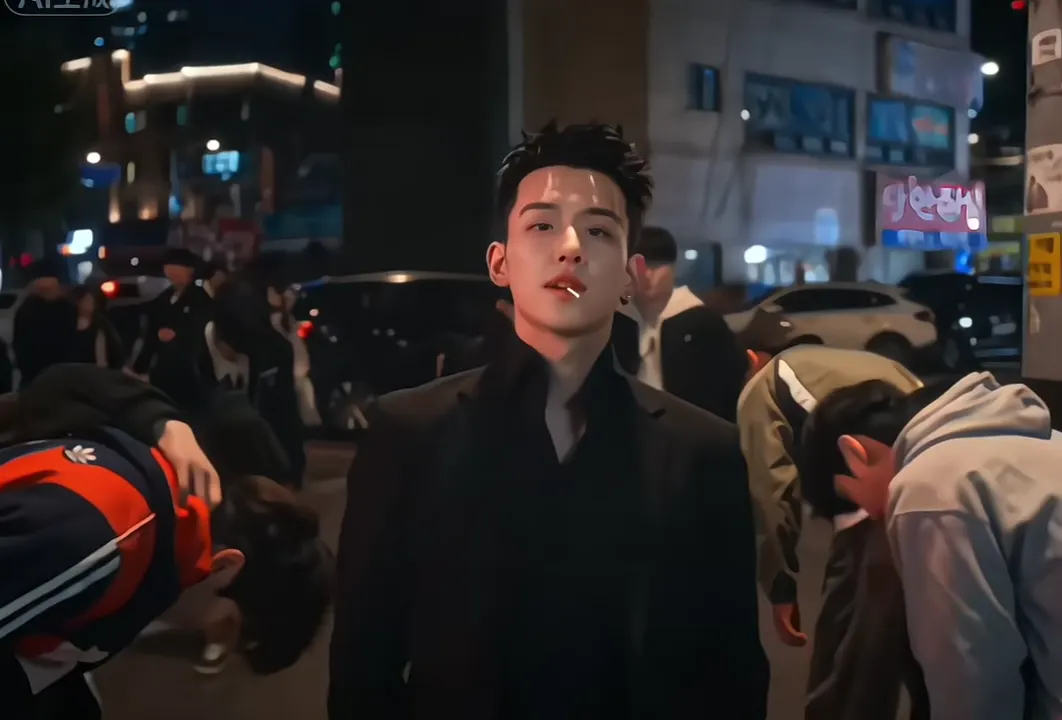
A night street where a whole crowd bows to you, a lollipop close-up, a stairwell, then a rooftop with your crew lined up behind you. Pick one of 16 King Jin AI trend clips, upload one photo, and the AI puts you in every shot with the same cuts and the original sound.
- 16 clips to remix
- One photo
- Four shots, one beat
- Original sound
Sexually explicit (NSFW) content is strictly prohibited.
Pick a sample
Rendering takes about 7 min. Finished clips land in History.
TL;DR
Rising · as ofThe King Jin AI trend is a CapCut AI template that turns one photo into a four-shot boss entrance: a crowd bowing to you on a night street, a lollipop close-up, a stairwell and a rooftop with your crew behind you, cut to the hardtekk track KIAT JUD DAY HARDTEKK. The template went up on 10 November 2026 and #kingjinaitrend passed 2 million views three days later. It is still rising.
- Original post
- The first big post: @i0159157’s King Jin AI Trend tutorial, 12 November 2026, 1.1M plays · @i0159157
- Sound
- KIAT JUD DAY HARDTEKK (TikTok Version) - hardangel — open it in TikTok and tap “Use this sound”.
- Also called
- king jin, king jin ai, king jin capcut, king jin trend, king jin incoming, king jin capcut template, #kingjinaitrend
- Last updated
King Jin AI Trend Videos to Remix
Sixteen King Jin AI trend clips: the man in black the template starts from, girls in a tracksuit, a medallion coat, a red rose dress and a leopard print, a hooded boy in a grass field, and more. Each is one version cut from a TikTok post, 7 to 10 seconds, with the sound it was posted with; pick the look closest to yours.
The man in black
@xdwshfzqi0k on TikTokMedallion coat
@xdwshfzqi0k on TikTokNavy tracksuit
@xdwshfzqi0k on TikTokBlonde in a rose dress
@tramthoigian_01 on TikTokLeopard print
@tramthoigian_01 on TikTokHood up in a grass field
@jimenjaiaef on TikTokBoy in a black tracksuit
@tramthoigian_01 on TikTokBrown leather jacket
@xdwshfzqi0k on TikTokBlack blazer, red lips
@jimenjaiaef on TikTokGothic lace
@zero01078 on TikTokShaggy hair, leather top
@w658515 on TikTokBlack vest and beads
@w658515 on TikTokLeather jacket, caramel hair
@zero01078 on TikTokLong black hair
@taeng.mo437 on TikTokAll in black
@zxscwxohswk on TikTokBangs and a print tee
@xdwshfzqi0k on TikTokWhat Is the King Jin AI Trend?
The King Jin AI trend is an 8-second entrance in four hard cuts. You stand still on a city street at night while a crowd of young men in dark jackets bows low around you. Cut to a close-up with a red lollipop in your mouth and a slow look into the lens. Cut to a teal stairwell under a green exit sign. Cut to a rooftop in daylight, skyscrapers behind, your crew lined up at your back and the wind in your hair.
It is made from one photo with CapCut’s AI template, which is why every post has the same street, the same bowing crowd and the same rooftop, and only the person in the middle changes. Most posts show two versions stacked, often a girl and a boy, then a screen recording of how to make it.
The look is a K-drama gang boss: the one everyone bows to, too calm to care. That is the whole joke and the whole flex, and it works for a selfie, a friend or your cat.
Timeline
The CapCut AI template behind every King Jin post goes up: one photo in, four shots out.
The #kingjinaitrend hashtag is created, and CapCut Pioneer accounts post the first tutorials.
@i0159157’s King Jin AI Trend tutorial passes 1.1 million plays.
@xdwshfzqi0k adds two more at 543K and 468K plays. The hashtag reaches 2.0 million views across 124 videos, and the template 28,453 uses.
Who Is King Jin, and What Does It Mean?
The posts never say. “King Jin” is the name the CapCut tutorial accounts gave the template, and the template starts from a man in a black jacket with a sharp undercut, the one the crowd bows to; the first clip on this page is him. “King” is the point: in the clip you are the boss of the street.
It is not BTS’s Jin, Kung Jin from Mortal Kombat or Jin from Tekken, though TikTok’s search mixes all of them in when you type “king jin”. Look for #kingjinaitrend to see the trend itself.
What Song Is the King Jin Trend?
KIAT JUD DAY HARDTEKK (TikTok Version) by hardangel, a fast hardtekk edit that was already the soundtrack to Patrick Jane, anime and UFC edits before the template picked it up. The four cuts land on its beat.
Every clip on this page keeps the sound it was posted with, and your remix keeps it too, so you can post it as it is.
King Jin AI Without CapCut
The trend runs on a CapCut template, so the tutorials send you to CapCut with a link. Here you pick the version you like from 16 real clips, upload one photo and get the same four shots with you in them, no template link or app needed.
How to Make a King Jin AI Trend Video
- 1
Pick a King Jin clip
The man in black, the medallion coat, the tracksuit, the rose dress or the hooded field. Pick the one whose hair and outfit are closest to yours.
- 2
Upload one photo
Your face to the camera, waist up, in good light. The street, the bowing crowd, the stairwell and the rooftop all come from the clip.
- 3
Create it and post it with the sound
You get the four shots with you in each one and KIAT JUD DAY HARDTEKK on it. Tag it #kingjinaitrend.
Tips for a Better King Jin AI Video
Face the camera
The lollipop close-up and the rooftop shot are face on, so a straight-on photo keeps you looking like you. Side profiles and sunglasses leave the model guessing.
Wear the part
Dark jackets, a leather coat or a tracksuit fit the night street best, and your outfit carries into every shot. Pick the clip with the closest clothes for the cleanest result.
Hair moves on the roof
The wind blows your hair in the last shot. Long hair shows it best, and a photo with your hair down gives the model the most to work with.
Keep a straight face
The boss does not grin. A calm, slightly bored look in your photo matches the half smile the clip gives you.
Friends and pets too
A photo of your best friend or your cat takes the boss’s place the same way, and the crowd still bows.
Pricing
Each King Jin AI trend video is one use (700 credits), whether you pick any length from 7 to 10 seconds. The price is on the button before you start, and nothing else is added.
A single use is $9.90; packs of 4 and 8 uses, or a monthly plan that posts trend videos to your accounts for you, cost less per video. A render that fails is refunded automatically.
Autopilot plans
Every month we turn the newest trends into meme videos and post them to your accounts. Each post is one of the plan’s videos, and any you make yourself come out of the same count. Cancel any time.
One-time video packs
Pay once and use them on any trend template, at any length. The credits never expire, and the other video tools can spend them too.
Use it responsibly
- Only upload photos of yourself, of people who said yes, or of your own pets.
- Do not use it to make someone look like they did something they did not.
- Label the result as AI when you post it; TikTok and Instagram both have an AI-generated tag.
Frequently Asked Questions
Who is King Jin?
Nobody the posts name. King Jin is what the CapCut tutorial accounts called the template, which starts from a man in a black jacket that a crowd bows to. In the trend, you are King Jin: your photo takes his place.
Where does the King Jin AI trend come from?
From a CapCut AI template that went up on 10 November 2026. The #kingjinaitrend hashtag followed on 11 November, and @i0159157’s tutorial passed 1.1M plays on 12 November.
Is there a tiger in the King Jin AI trend?
No. The King Jin posts on TikTok show the bowing crowd, the lollipop, the stairwell and the rooftop, with no animal in them. A tiger fight is a different AI effect.
What song is used in the King Jin trend?
KIAT JUD DAY HARDTEKK (TikTok Version) by hardangel. The clips on this page keep it, and so does the video you make.
Do I need CapCut to make it?
No. Pick a clip on this page and upload one photo. The AI makes the four shots with you in them and the original sound.
How long is the video?
As long as the clip you pick, 7 to 10 seconds. The price is one use, whichever clip you pick.
What is the King Jin AI Trend prompt?
The four-shot boss entrance prompt is in the AI Prompts section below. It starts: "A cinematic 4:3 video in four hard cuts on the beat of a fast hardtekk track." Paste the rest into any AI video tool that accepts your photos.
Make the Whole Street Bow
One photo, four shots, a bowing crowd and your crew on the rooftop. Your King Jin AI trend video, ready to post with the sound on.
Make my King Jin videoMore Trends to Remix
Need for Speed AI Trend
All I Want for Christmas Glow Up
Almost Almost Meme
Misanthropy Meme
Outfit Change Transition
Lego Car Wash AI
Counting Money AI Trend
Christmas Princess Carriage
King Jin AI Trend Prompts
The prompts behind the versions on this page: the four-shot boss entrance, the same entrance at school, your cat as the boss and the rooftop shot on its own. Each takes one photo and keeps the beats of the original.
Four-shot boss entrance
A cinematic 4:3 video in four hard cuts on the beat of a fast hardtekk track. Image 1 is the boss, keeping their exact face, hair, skin tone and outfit from the photo. Shot 1: a city street at night, neon signs and parked cars behind; Image 1 stands still in the middle, chin up, while a crowd of young men in dark jackets bows low all around them. Shot 2: a close-up under the street lights, a red lollipop in their mouth, a slow look into the camera and a half smile. Shot 3: a teal-walled stairwell with a green exit sign; they stand at the foot of the stairs and the camera pushes in. Shot 4: a rooftop in daylight with skyscrapers behind, a line of the same young men standing behind them, the wind blowing their hair as they stare down the camera. Keep the four shots, their order, the hard cuts on the beat, the camera moves, the lighting and the bowing crowd exactly as in the reference clip. Only the main person changes. Audio: the original sound of the trend, as in the reference.
Other versions: School hallway boss · My cat runs this street · Rooftop crew only