
Ukwu CapCut Template: Do the Ukwu Trend With One Photo
The Ukwu trend is ten seconds and one cut: you vibe in colour, the beat drops, and the clip turns into a slow-motion black-and-white close-up that looks like a film still. The Ukwu CapCut template has been used more than 660,000 times since 24 October, mostly from Nigeria. Pick one of the fifteen clips below, add one photo, and the AI puts you in it — the same moves, the same cut, the same slow black and white, with the original sound.
- Fifteen clips to remix
- One photo
- Original sound
- No watermark
Sexually explicit (NSFW) content is strictly prohibited.
Pick a sample
Rendering takes about 7 min. Finished clips land in History.
TL;DR
At its peak · as ofUkwu is a CapCut template from Nigerian TikTok: you vibe in colour for five seconds, the beat drops, and the clip cuts to a slow-motion black-and-white close-up for the rest. Editor MRSOFT EDITZ posted it on 24 October 2026 with its own sound, and within twelve days it had 666,000 uses and 118,000 videos, the biggest past two million plays. Ukwu is Igbo for waist, which is why posters caption it “Ukwu” with a wink. It is at its peak: new takes land every day, but the biggest posts are a week old.
- Original post
- @mrsoftedit (MRSOFT EDITZ), 24 October 2026: “Ukwu template”, the post the CapCut template and the sound come from · @mrsoftedit
- Sound
- original sound - mrsoftedit — open it in TikTok and tap “Use this sound”.
- Also called
- ukwu trend, ukwu capcut, ukwu capcut tutorial, ukwu template, ukwu tiktok trend, ukwu challenge, ukwu filter, ukwu capcut trend, #ukwu, #ukwuchallenge
- Last updated
Ukwu Trend Videos to Remix
Fifteen Ukwu posts, most liked first, each the full ten seconds of the Ukwu CapCut template: bedrooms, a staircase, ring lights, a party, a cowboy hat, a hallway, a car on red earth, and the template maker’s own post. Each one cuts from colour to slow-motion black and white on the beat. Pick the Ukwu clip you want to be in.
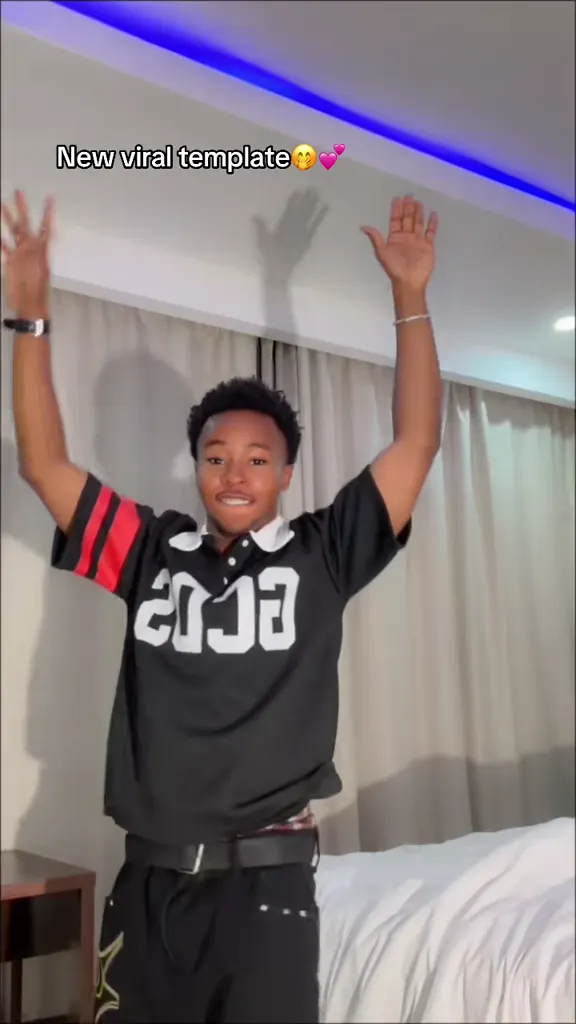
Arms up in the jersey
@charles.chima on TikTokMy bestie go think say I no love am
@iam_esabella on TikTokUkwu, red lips and a sparkle cap
@makuochii on TikTokOn the stairs
@iam_rede on TikTokDancing while the little one climbs
@esohe_2026 on TikTokLaughing at the ring light
@iam_rede on TikTokHoodie, hand on the head
@officialedit04 on TikTokUkwu under the party lights
@callmeprinceez on TikTokGlasses and a slow smile
@makuochii on TikTokOut in the sun
@roxane0122 on TikTokCowboy hat in the car
@sankolee5 on TikTokAnkara top under a blue sky
@223rollermaya on TikTokSitting on the bonnet
@boubsone09 on TikTokWalking the hallway
@blackpoupee1 on TikTokThe template maker’s own post
@mrsoftedit on TikTokWhat Is the Ukwu Trend, and What Does Ukwu Mean?
The Ukwu trend is a ten-second CapCut edit. The first half is you in colour, vibing to the beat — a small dance, a sway of the waist, hands at the camera, a look. On the drop the clip cuts closer and slows down, and everything goes soft black and white, so the second half looks like a moving film still. That one cut is the whole trend: it makes an ordinary bedroom clip look like a music-video moment.
What does Ukwu mean? Ukwu is the Igbo word for waist, and in names it also means great, as in Chukwu. On TikTok it is the template’s name and the caption everyone posts it with — “Ukwu 🔥”, “Ukwu 😂😍”, “UKWU!” — usually with a wink at the waist part. The sound is “original sound - mrsoftedit”, which TikTok matches to “No Be Today” by Baby face.
It is not the Ukwu dance. “Ukwu challenge dance”, Egwu Ukwu and the songs “Ukwu” by Timaya and “Ukwu Nwata” by Flavour are the Igbo waist dance, a much older trend. The Ukwu CapCut template is about the edit, not the steps: people barely dance, they just vibe until the cut.
This page does the Ukwu CapCut template without CapCut. Pick a clip, add a photo, and a video model puts you into that exact clip: the colour half, the cut, the slow black-and-white half and the sound all stay where the post has them. You do not need a video of yourself, only a photo.
Timeline
MRSOFT EDITZ publishes the “Ukwu” CapCut template and its sound, then posts “Ukwu template”. The same day @makuochii’s “Ukwu 🔥” (645K plays) and @iam_rede’s take (546K) credit the editor and take off.
@charles.chima’s “New viral template”, arms up in a jersey, reaches 1.25M plays and 168K likes.
The Pidgin captions start: @iam_esabella’s “My bestie go think say I no love am…” hits 681K plays; a day later one-word captions like @callmeprinceez’s “Ukwu 😂😍” (387K) are the norm.
The biggest Ukwu post so far, 2.0M plays and 456K likes, lands a week after the template appeared.
The template passes 666,000 uses and the sound 118,000 videos, with takes now coming from Guinea and Brazil as well as Nigeria.
How to Make the Ukwu Trend With a Photo
- 1
Pick the Ukwu clip
Every clip is the Ukwu CapCut template’s ten seconds, colour first and black and white after the drop. Choose by the room and the moves: a bedroom with a ring light, a staircase, a party, outside in the sun, beside a car.
- 2
Upload one photo
One clear photo of the person who should be in the clip, face lit and at least waist up, in the outfit you want to see. The AI keeps the face recognisable in the black-and-white half too.
- 3
Create it and post it
You get the clip back with you in it, cut on the beat and with the sound already on. Caption it “Ukwu” with an emoji, credit the template the way TikTok does, and keep the AI label on.
Tips for a Better Ukwu Video
Waist up or more
The colour half is all hands, shoulders and waist. A photo cut off at the chin leaves the AI to invent the body, and the vibe goes stiff.
A clear face for the black-and-white half
After the drop the clip moves in close and drops the colour, so the face carries the second half. A sharp, well-lit face in the photo keeps it looking like you without the colour to help.
Match the outfit to the clip
The outfit comes from your photo. A dark hoodie reads well in the bedroom clips, a bright top in the outdoor ones, where the switch to black and white is the most striking.
Full-body clips for full-body photos
The staircase, the hallway and the car show the whole body. Use a full-length photo there; for a selfie, pick a close clip like the ring light or the red lips.
Keep the caption short
The best-liked Ukwu posts say one word, “Ukwu”, and an emoji. Let the cut do the work.
Pricing
Each Ukwu trend video is one use (700 credits), whether you pick 9 or 10 seconds. The price is on the button before you start, and nothing else is added.
A single use is $9.90; packs of 4 and 8 uses, or a monthly plan that posts trend videos to your accounts for you, cost less per video. A render that fails is refunded automatically.
Autopilot plans
Every month we turn the newest trends into meme videos and post them to your accounts. Each post is one of the plan’s videos, and any you make yourself come out of the same count. Cancel any time.
One-time video packs
Pay once and use them on any trend template, at any length. The credits never expire, and the other video tools can spend them too.
Use it responsibly
- Only upload photos of yourself, of people who said yes, or of your own pets.
- Do not use it to make someone look like they did something they did not.
- Label the result as AI when you post it; TikTok and Instagram both have an AI-generated tag.
Frequently Asked Questions
What is the Ukwu trend on TikTok?
A CapCut template trend from late October 2026: ten seconds of you vibing in colour, then a cut on the beat drop to a slow-motion black-and-white close-up. It started with the “Ukwu” template by MRSOFT EDITZ on 24 October and spread from Nigerian TikTok, with more than 660,000 uses by 5 November.
What does Ukwu mean?
Ukwu is Igbo for waist, and it also means great in names like Chukwu. In the trend it is the template’s name and the one-word caption people post it with, usually with a winking emoji.
What song is the Ukwu trend?
TikTok lists it as “original sound - mrsoftedit”, uploaded with the template on 24 October 2026 and used in more than 118,000 videos; TikTok matches the music to “No Be Today” by Baby face. Every clip on this page keeps that sound.
Where do I find the Ukwu CapCut template?
On TikTok, under any Ukwu post: tap “CapCut · Try this template” above the caption. It needs CapCut and a video of you. Here you skip both — pick one of the fifteen clips, upload a photo, and the AI puts you in the clip.
Is it the same as the Ukwu dance or Egwu Ukwu?
No. The Ukwu dance and Egwu Ukwu are the Igbo waist dance, with songs like Timaya’s “Ukwu” and Flavour’s “Ukwu Nwata”. The Ukwu CapCut template is an edit: the cut from colour to slow black and white is the trend, and the moves are free.
Is it the photogenic filter?
It looks close, but it is a different edit. The photogenic filter flashes like a camera shutter, freezes on a black-and-white still and brings the colour back for the next pose. Ukwu has no flash and no freeze: one cut, then slow motion in black and white to the end, on its own sound.
Can I do the Ukwu trend with just a photo?
Yes. The CapCut template wants a video, but this page needs one photo: the AI animates you inside the clip you pick, with the moves, the cut and the slow motion taken from the clip.
How long is the Ukwu video?
Ten seconds, like the Ukwu CapCut template, vertical 9:16 with the original sound — ready for TikTok, Reels or Shorts as it comes out.
What is the Ukwu CapCut Template AI prompt?
The clip you pick prompt is in the AI Prompts section below. It starts: "Ukwu trend video, vertical 9:16, ten seconds, one person alone, filmed on a phone at chest height in the reference clip’s room." Paste the rest into any AI video tool that accepts your photos.
Your Turn to Hit the Ukwu Cut
Pick a clip, upload one photo, and the Ukwu trend is yours: colour, the beat drop, slow-motion black and white, and the sound.
Make my Ukwu videoMore Trends to Remix
Let's Break Up Trend
Christmas PFP
Mandem in Disguise Trend
Rugrats Cartoon Trend
Billy The Puppet Costume
One Photo Cinematic Reveal
I Want Wings Glow Up
Charlie Brown Christmas Filter
Ukwu Trend AI Prompts
The prompts behind the Ukwu versions on this page: the clip you pick, the bestie caption, the outdoor take and the car. Each works in any image-to-video model that takes a reference photo and a reference clip, and each keeps the cut from colour to slow-motion black and white on the beat.
Clip you pick
Ukwu trend video, vertical 9:16, ten seconds, one person alone, filmed on a phone at chest height in the reference clip’s room. Image 1 is that person, with their own face, hair, outfit and build. The clip fades up from black on a person vibing to the beat in full colour for about five seconds: a little dance, a lean, a hand through the hair, a cheeky look at the camera. On the beat drop it hard-cuts to a closer, slightly pushed-in shot of the same person in slow motion, graded down to a soft, low-contrast black and white with a cool or sepia tint, like a film still that keeps moving. The slow black-and-white half runs to the end. Keep the room or the street, the light, the camera, the framing, the timing of the cut, the slow motion, the black-and-white grade, any on-screen caption and the original sound of the reference exactly as they are. Do not add people.
Other versions: Bestie caption · Outside in the sun · Leaning on the car