
AI Hair Dye Filter: See Any Hair Color Before You Dye It
The AI hair dye filter without a CapCut template. Pick one of the clips below, upload a single photo, and the AI dyes your hair the same colour, in the same clip, with the sound of the post you chose.
- One photo
- Cherry red, copper, blonde, black
- Dye bowl and reveal included
- Original sound
Sexually explicit (NSFW) content is strictly prohibited.
Pick a sample
Rendering takes about 7 min. Finished clips land in History.
TL;DR
At its peak · as ofThe AI hair dye filter is the TikTok effect that dyes your hair on camera: a bowl of cherry-red dye, a brush through the strands, then long glossy burgundy hair, a flat iron and curls. Nothing is actually dyed — one photo goes into a CapCut template and an eleven-second video comes out. It is still running at full volume: the template behind it passed 15.5M uses and picks up about 268,000 more a day, even though its own hashtag is nearly empty.
- Original post
- The 2023 colour-filter clip that made the effect a TikTok staple · @idylleed
- Sound
- original sound - beauty03954 — open it in TikTok and tap “Use this sound”.
- Also called
- hair dye filter, ai hair color filter, hair color change filter, hair color ranking filter, ai hair color changer, CapCut AI hair dye filter, burgundy hair filter, cherry red hair filter
- Last updated
AI Hair Dye Filter Examples
Fourteen AI hair dye filter clips from TikTok: the ten-shade rankings first, then the single-shade tests, then the four AI dye videos from the CapCut template. Each one lands on a different colour, which is the point of the effect.
Ten shades on one guy, 2.5M likes
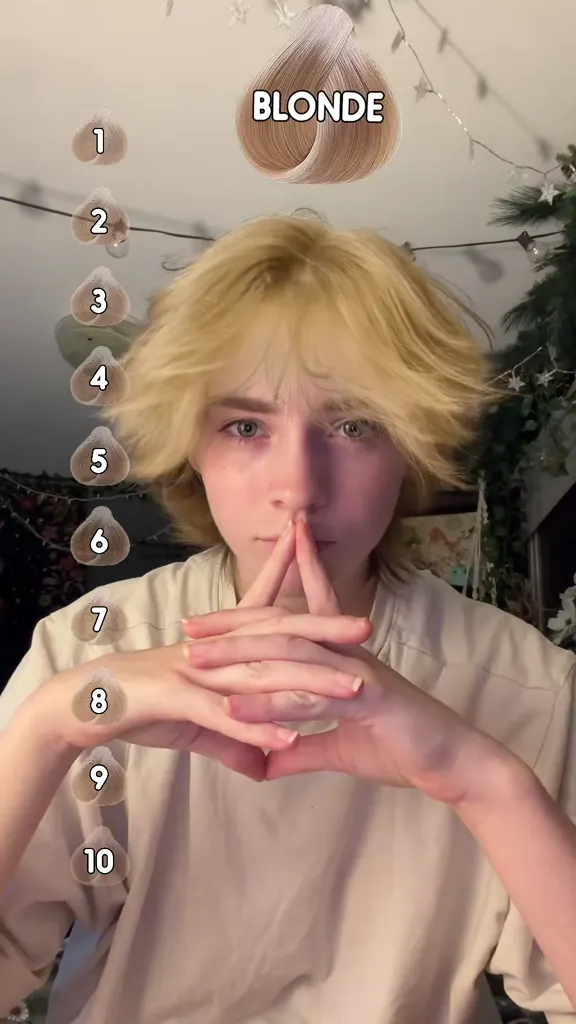
@thomasfinn_08 on TikTok“The most realistic blonde hair filter”
@marina.filips on TikTokThe red, rated “almost 100%”
@heavenleerx on TikTokRanking the shades one to ten
@regenadavids on TikTok“What was y’all’s fav”
@user300304818188 on TikTokRed and purple, one face, eleven seconds
@idylleed on TikTokEvery shade gets a name
@howmanyleona on TikTokThe pastel run
@leia_goldstein on TikTok“Trying on TikTok hair filters”
@shirleypunpun on TikTokBowl to burgundy, in the template’s own order
@itsceen8 on TikTokThe hot-pink version
@dailyccut on TikTokSplit dye, ranked
@jacmystyle on TikTokBurgundy over a blonde base, in Nepal
@rabina.thapa046 on TikTok“Decided to try the trending AI hair dye filter”
@oladunninaomi02 on TikTokWhat Is the AI Hair Dye Filter?
The AI hair dye filter is the TikTok effect that dyes your hair on camera. One photo goes in and a clip comes back: a bowl of cherry-red dye brushed through the strands, then long straight burgundy hair, a flat iron gliding down it and a head of glossy curls. Nothing is actually dyed.
It comes in two shapes, and both are in the gallery above. The newer one is the AI dye video: eleven seconds, dye bowl to curls, made in a CapCut template (the template behind it has 15.5M uses). The older one is the colour filter: your photo, a 1-10 slider down the side of the frame, and the hair changing shade every beat so you can rank them. That one has been on TikTok since 2023 and still produces the biggest clips — 46M plays for one face sliding from black to blonde to red to purple.
The numbers say what this thing is for. On 30 October #hairdyefilter had 437 videos and 6.0M views; #aihairdyefilter, the name the tutorials themselves use, had 2 videos and 3,658 views on 1 November. The CapCut template, meanwhile, picks up about 268,000 new uses a day. Nobody is watching this meme — people are using it, the way you use a paint chart in a hardware shop, to decide what to do with their own head before spending four hours and eighty dollars at a salon.
That is why this page is arranged as a colour test rather than a clip show. Every sample ends on a different shade, from the cherry red the template defaults to through copper, blonde, black and split dye, and each one can be re-shot with your face: pick the clip whose last frame you want to see in the mirror, upload one photo, and the AI rebuilds that clip with you in it, at the sample’s length, with the post’s own sound. No CapCut template, no screen recording, no watermark.
Timeline
@idylleed posts the clip the format is built on: one face, one wall, the hair sliding from black to blonde to red to purple. It reaches 46M plays.
@thomasfinn_08 takes the ranking version to 46.3M plays and 2.5M likes: a ten-step slider, a new colour at every beat.
Cherry red becomes the colour of the trend: “how to make the cherry red hair dye trend” tutorials start passing two million plays.
The “original sound” that most AI hair dye clips now carry is first posted to TikTok.
The first English “How to Use AI Hair Dye Filter” tutorials appear and pass a million plays; Arabic, Spanish and Nepali copies follow within days.
The CapCut template behind the AI version passes 15.5M uses, about 268,000 of them in a single day, while #hairdyefilter sits at 437 videos and 6M views.
How to Make an AI Hair Dye Filter Video With One Photo
- 1
Pick the colour you are actually considering
Each sample ends on a different shade and starts in a different room, and the clip you pick decides the colour, the camera and the sound you get back. Cherry red is the one the trend defaults to; the copper and blonde samples are the ones people use when they are deciding whether to go lighter.
- 2
Upload one photo with the hair loose
A sharp, front-facing photo, hair down and your whole head in frame. The AI reads your face, skin tone, hairline and the room behind you from it, so the dye lands on you rather than on a stranger, and the clip happens where the photo was taken.
- 3
Generate, then post it or take it to a salon
The prompt is already written for you, and the clip comes back at the sample’s length with the post’s own sound. Post it with #aihairdyefilter, or hold it next to a dye box in the shop — the clip shows the colour and the length, which is what a swatch on the back of a box cannot do.
Making the Dye Look Real
Nothing over the hair
A hat, a scarf, a headband or hair tied up leaves the dye nothing to land on, and the AI either invents hair or paints the scalp. Hair loose, both shoulders in frame: that is the framing every clip in the trend uses.
The hairline is where it gives itself away
Real dye stops at the skin. If the colour bleeds onto the forehead, the ears or the neck, the clip reads as a filter no matter how good the hair looks, so say “the scalp and the skin unstained” in the prompt and check the first frame at full size.
One head, two hands
The other tell is the hands: a third hand, a hairdresser in shot, or fingers that melt around the brush. Keep the frame to one person and let the hands stay at the edge of it.
Match the light the photo was taken in
A cherry red under bedroom light and a cherry red in daylight are two different colours. The clip keeps the room from your photo, so pick a sample shot in similar light — that is why the gallery has both bedroom clips and outdoor ones.
Blonde needs a shadow root
A flat, even blonde is the fastest way to look generated: real lifts leave the roots a shade darker. The blonde prompt asks for it, and the blonde sample on this page is the one people point at when they say the filter looks real.
Pricing
Each AI hair dye filter video is one use (700 credits), whether you pick any length from 7 to 15 seconds. The price is on the button before you start, and nothing else is added.
A single use is $9.90; packs of 4 and 8 uses, or a monthly plan that posts trend videos to your accounts for you, cost less per video. A render that fails is refunded automatically.
Autopilot plans
Every month we turn the newest trends into meme videos and post them to your accounts. Each post is one of the plan’s videos, and any you make yourself come out of the same count. Cancel any time.
One-time video packs
Pay once and use them on any trend template, at any length. The credits never expire, and the other video tools can spend them too.
Use it responsibly
- Only upload photos of yourself, of people who said yes, or of your own pets.
- Do not use it to make someone look like they did something they did not.
- Label the result as AI when you post it; TikTok and Instagram both have an AI-generated tag.
- The filter dyes nothing: do not pass the clip off as a real dye job, and do not run a photo of someone else through it to show them a colour they did not choose.
Frequently Asked Questions
What is the AI hair dye filter?
It is the TikTok effect that dyes your hair on camera. One photo goes in and an eleven-second clip comes back: a bowl of cherry-red dye, a brush through the strands, long straight burgundy hair, a flat iron, then curls. Nothing is actually dyed — the video is generated from the photo.
How do I make the AI hair dye filter on TikTok?
The manual way is a CapCut template: search “hair dye” or “AI hair dye” in CapCut, add your photo, let it render, then post it to the trend’s sound. The faster way is here: pick a sample whose last frame shows the colour you want, upload one photo, and the AI builds the same clip with your face.
Is the CapCut hair dye template free?
The template is free to use, but exports carry the CapCut watermark — that “CapCut AI” in the corner of most of the clips in this trend. Here you download a clean MP4 with no watermark, and the clip is generated rather than assembled from a template.
Which colour should I try first?
Cherry red is the trend’s own colour and the safest test: it reads on dark hair, on blonde and indoors. Copper flatters warm skin, jet black is the one people regret, and blonde is hardest to judge because a real lift needs a shadow at the roots. Run two samples and compare the last frame of each.
Does it work on dark or black hair?
Yes. The dye is drawn onto the hair in the clip, so it can land on any starting colour, and braids, coils and curls keep their texture while the colour changes. The one thing to avoid is hair that is tied up or covered, since the clip needs hair in frame to paint.
Is the AI hair dye filter a photo or a video?
The one that went around is a video, and that is the difference from the hair colour changers ranking next to it: media.io, eidora and the salon AR try-ons give you a still picture of the new colour. Here you get the clip — the dye going on, the iron, the curls — with your face in it.
Does the AI hair dye filter look real?
Convincing at a glance, and easy to spot at full size. What gives it away is the hairline — colour bleeding onto the forehead or the scalp — and the hands around the brush. Get those two right and people comment on the colour instead of on the AI, which is exactly what the trend’s top comments are about.
Can I use it for short hair or for men?
Yes. The colour is what the effect sells, not the length, and the ranking samples here include a man with short hair doing ten shades. For a buzz cut or a fade, pick a sample where the head is in frame from the front and the clip does not depend on long hair moving.
Can I put a friend or a celebrity in it?
A friend with their permission, yes. Celebrity photos run through colour filters are common on TikTok, but a clip that puts words or a fake dye job in someone’s mouth is a different thing — keep it to colour, label it as AI, and do not use it to make anyone look bad.
Is this the same as an AI hair colour changer?
Same request, different output. “AI hair colour changer” and “AI hair colour filter” mostly return photo editors that swap the shade on a still. This page is the video version of that idea: the dye bowl, the reveal and the curls, at the sample’s length and with the post’s sound.
Is the hair dye filter the same as a hair removal filter?
No, and the two get mixed up in search. A hair dye filter changes the colour of the hair on your head; a hair removal filter is the handheld IPL device in the advert. Nothing on this page removes hair — it only repaints it, and the clip keeps your length.
How long is the video, and can I choose the sound?
Each clip is as long as the sample you pick, from 7 to 17 seconds, and it keeps that sample’s sound — the trend’s original audio on the AI dye clips, whatever the post used on the ranking ones. That is the length the trend posts run at, so it loops the same way on TikTok, Reels and Shorts.
What is the AI Hair Dye Filter prompt?
The cherry red prompt is in the AI Prompts section below. It starts: "Image 1 is the Person." Paste the rest into any AI video tool that accepts your photos.
Try the Colour Before the Dye
One photo, one clip, and the AI hair dye filter puts the colour on your own head with the sound of the post you picked.
Make my hair dye videoMore Trends to Remix
I Want Wings Glow Up
Charlie Brown Christmas Filter
Then I Walk In
Angel Of My Dreams
Fairytale Catrina
Le Dije A ChatGPT
Venom Car Trend
Enchantress Filter
AI Hair Dye Filter Prompts
The six prompts behind the page, for any image-to-video model that takes a reference photo: the cherry red, the copper, the blonde, the jet black, the split dye and the colour ranking. Each one spells out the dye bowl, the brush, the iron and the curls, because that sequence is what makes the clip read as this trend rather than as a generic hair-colour change.
Cherry red
Image 1 is the Person. They hold a glass bowl of thick dye in one hand and a wide dye brush in the other, dip the brush and paint the colour from the parting down, every stroke turning the strands a deeper shade. The colour is cherry red: a deep wine red with a brighter red shine along the parting. Then a quick cut: the hair is long, straight and glossy in the new colour, and they run both hands through it. Then a flat iron glides down from the roots to the ends in one slow pass. Then the hair is in big, bouncy curls, and they lift a curl and let it drop, flip the hair back over one shoulder and smile into the lens. The person from Image 1 is the one on screen: keep their face, skin tone, hairline, expression and clothes exactly as in Image 1, and the room behind them. Vertical phone video, one person in the frame, framed from the chest up, soft indoor daylight, no text, no logos, no app interface. Audio: the brush through the hair, the hiss of the flat iron, a light beat and a small laugh.
Other versions: Copper · Blonde · Jet black · Split dye · Colour ranking